<?xml version="1.0" encoding="utf-8"?><feed xmlns="http://www.w3.org/2005/Atom" ><generator uri="https://jekyllrb.com/" version="3.10.0">Jekyll</generator><link href="https://snijsure-personal.github.io/feed.xml" rel="self" type="application/atom+xml" /><link href="https://snijsure-personal.github.io/" rel="alternate" type="text/html" /><updated>2026-06-04T13:57:22+00:00</updated><id>https://snijsure-personal.github.io/feed.xml</id><title type="html">Subodh Nijsure</title><subtitle>Engineering blog — ML, RAG systems, Android, and whatever I am currently building.</subtitle><author><name>Subodh Nijsure</name></author><entry><title type="html">Shipping RAG: The Quest for Quality</title><link href="https://snijsure-personal.github.io/2026/06/03/shipping-rag-quest-for-quality/" rel="alternate" type="text/html" title="Shipping RAG: The Quest for Quality" /><published>2026-06-03T00:00:00+00:00</published><updated>2026-06-03T00:00:00+00:00</updated><id>https://snijsure-personal.github.io/2026/06/03/shipping-rag-quest-for-quality</id><content type="html" xml:base="https://snijsure-personal.github.io/2026/06/03/shipping-rag-quest-for-quality/"><![CDATA[<p><em>Companion to <a href="https://snijsure-personal.github.io/2026/05/17/rag-system-real-messy-data/">Part 1: What I Learned Building a RAG System on Real, Messy Data</a>.</em></p>

<hr />

<h2 id="where-part-1-left-off">Where Part 1 Left Off</h2>

<p>Part 1 was about getting <a href="https://www.permit-iq.com/">PermitIQ</a> to the point where it returned plausible answers across 60+ city municipal codes. Scraping. Chunking. Embedding. The data pipeline. The standard <a href="https://en.wikipedia.org/wiki/Retrieval-augmented_generation">RAG (Retrieval-Augmented Generation)</a> playbook with some changes I made along the way.</p>

<p>By the end of that article the system worked. I had deployed it, the URL resolved, and “build an <a href="https://en.wikipedia.org/wiki/Accessory_dwelling_unit">ADU (Accessory Dwelling Unit)</a> in Berkeley” came back with a sensible answer and cited sections.</p>

<p>That was the easy part.</p>

<p>This post is what happened after I started actually using it, what broke, what I changed, what I measured, and how much it cost me to find out.</p>

<hr />

<h2 id="shortcomings-of-the-phase-1-implementation">Shortcomings of the Phase 1 Implementation</h2>

<p>I had quietly assumed that if Oakland worked well, the other 59 cities would be in the same ballpark. They were not. The first time I ran a single question against every city in the system, more than a third of them returned garbage. That kicked off everything that follows.</p>

<p>I’ll walk through it in the order it happened: the audit that revealed the problem, the bugs I had to fix, the improvements I shipped, and the measurement framework I built so I could stop guessing.</p>

<hr />

<h2 id="the-quality-audit-one-question-35-cities">The Quality Audit: One Question, 35 Cities</h2>

<p>I wrote a short async script that hit <code class="language-plaintext highlighter-rouge">/api/chat</code> for every live city in the system with the same question:</p>

<blockquote>
  <p><em>“What permits do I need for a kitchen remodel?”</em></p>
</blockquote>

<p>Then I dumped the answers into a single file and read all of them.</p>

<p><strong>Fourteen of thirty-five cities returned garbage or nothing.</strong> Root causes, in roughly the order I uncovered them:</p>

<ul>
  <li><strong>Empty Indexes:</strong> Several cities had been flipped to <code class="language-plaintext highlighter-rouge">live</code> status before their scrape job had actually run successfully.</li>
  <li><strong>Bot Protection:</strong> Some cities were behind bot-protection systems. The scraper got a 200 response with an “Access Denied, please complete the captcha” page in the body. The system happily indexed the rejection notice as if it were code.</li>
  <li><strong>Stale Seeds:</strong> City websites redesigned, URLs 404’d, and the embedding model dutifully encoded “Page Not Found” as a vector.</li>
</ul>

<p>The takeaway: <strong>one doesn’t know RAG quality until it is tested systematically.</strong> A quality gate script should be a deployment step, not an afterthought.</p>

<hr />

<h2 id="the-hnsw-filtered-query-bug">The HNSW Filtered Query Bug</h2>

<p>Most cities had not just thin data; they were returning zero results for <em>every</em> query. I assumed I had broken the retrieval pipeline. I had not. I had broken the index.</p>

<p>I had recently migrated the database from per-city schemas into one shared <code class="language-plaintext highlighter-rouge">embeddings</code> table with a <code class="language-plaintext highlighter-rouge">city</code> column. The advantage was one <a href="https://en.wikipedia.org/wiki/Hierarchical_navigable_small_world">HNSW (Hierarchical Navigable Small World)</a> index instead of 60. The bug was that the HNSW index now spanned all cities globally.</p>

<p>The query I was running looked like this:</p>

<div class="language-sql highlighter-rouge"><div class="highlight"><pre class="highlight"><code><span class="k">SELECT</span> <span class="p">...</span> <span class="k">FROM</span> <span class="n">embeddings</span>
<span class="k">WHERE</span> <span class="n">city</span> <span class="o">=</span> <span class="s1">'houston'</span>
<span class="k">ORDER</span> <span class="k">BY</span> <span class="n">embedding</span> <span class="o">&lt;=&gt;</span> <span class="err">$</span><span class="mi">1</span><span class="p">::</span><span class="n">vector</span>
<span class="k">LIMIT</span> <span class="mi">12</span><span class="p">;</span>
</code></pre></div></div>

<p>What HNSW actually does on that query: it walks the graph and returns the 12 globally nearest vectors. Then PostgreSQL applies the <code class="language-plaintext highlighter-rouge">WHERE city = 'houston'</code> filter to those 12 rows. The global nearest neighbors are dominated by Denver (178k rows) and Austin (104k rows), both of which have very dense embedding spaces. After the filter, one gets zero Houston rows. The user sees “No results found.”</p>

<p>The fix was a one-line GUC (Grand Unified Configuration parameter) introduced in <code class="language-plaintext highlighter-rouge">pgvector</code> 0.8.0:</p>

<div class="language-sql highlighter-rouge"><div class="highlight"><pre class="highlight"><code><span class="k">SET</span> <span class="n">hnsw</span><span class="p">.</span><span class="n">iterative_scan</span> <span class="o">=</span> <span class="n">relaxed_order</span><span class="p">;</span>
<span class="k">SELECT</span> <span class="p">...</span> <span class="k">FROM</span> <span class="n">embeddings</span> <span class="k">WHERE</span> <span class="n">city</span> <span class="o">=</span> <span class="err">$</span><span class="mi">1</span>
<span class="k">ORDER</span> <span class="k">BY</span> <span class="n">embedding</span> <span class="o">&lt;=&gt;</span> <span class="err">$</span><span class="mi">2</span> <span class="k">LIMIT</span> <span class="mi">12</span><span class="p">;</span>
</code></pre></div></div>

<p><code class="language-plaintext highlighter-rouge">iterative_scan = relaxed_order</code> tells the planner to keep expanding the HNSW search until it accumulates enough rows that <em>also</em> satisfy the <code class="language-plaintext highlighter-rouge">WHERE</code> clause.</p>

<p>There was a second, smaller bug hiding behind the first: <code class="language-plaintext highlighter-rouge">SET</code> and <code class="language-plaintext highlighter-rouge">SELECT</code> need to run on the same database connection. My code was using two separate <code class="language-plaintext highlighter-rouge">pool.query()</code> calls, which were grabbing different pooled clients. The <code class="language-plaintext highlighter-rouge">SET</code> was effectively a no-op for the subsequent <code class="language-plaintext highlighter-rouge">SELECT</code>. Switching to a dedicated <code class="language-plaintext highlighter-rouge">pool.connect()</code> for the pair fixed it.</p>

<hr />

<h2 id="the-system-prompt-banning-the-apology">The System Prompt: Banning the Apology</h2>

<p>Even cities with good data were producing answers like: <em>“Unfortunately, the retrieved sections don’t specifically address…”</em></p>

<p>The model’s default is to hedge when uncertain. One has to explicitly ban the behavior.</p>
<ul>
  <li><em>“Do NOT open with disclaimers, apologies, or ‘unfortunately’. Lead directly with the answer.”</em></li>
  <li><em>“First share everything the retrieved sections DO say, then add ONE brief closing note if something is genuinely missing.”</em></li>
</ul>

<p>The texture of the answers changed immediately. Leading with substance matters.</p>

<hr />

<h2 id="what-can-i-ask-coverage-before-the-first-question">“What Can I Ask?”: Coverage Before the First Question</h2>

<p>A user lands on a thin-data city, asks a question, gets a bad answer, and loses trust in the entire system.</p>

<p>The fix: surface coverage information upfront. <code class="language-plaintext highlighter-rouge">GET /api/coverage/[cityId]</code> queries the database for chunk counts and a random sample of breadcrumb paths. A small <a href="https://en.wikipedia.org/wiki/Large_language_model">LLM (Large Language Model)</a> then summarizes these into 3 - 4 plain-English sentences. The honest framing of what the system <em>doesn’t</em> cover pre-empts the trust-killer.</p>

<hr />

<h2 id="hybrid-search-bm25--dense-vectors--rrf">Hybrid Search: BM25 + Dense Vectors + RRF</h2>

<p>Pure vector search fails on exact-match queries like “Section 420.6” or “Title 17”. Semantic search is great for intent; it’s terrible for legal citations.</p>

<p>The fix is hybrid search:</p>
<ul>
  <li><strong>Dense pass</strong>: HNSW cosine similarity.</li>
  <li><strong>Sparse pass</strong>: PostgreSQL full-text search (BM25 ranking).</li>
  <li><strong>Fusion</strong>: <a href="https://en.wikipedia.org/wiki/Rank_fusion">Reciprocal Rank Fusion (RRF)</a>, <code class="language-plaintext highlighter-rouge">score = Σ 1/(rank + 60)</code>.</li>
</ul>

<p>Rank fusion sidesteps the normalization problem between cosine distances and <a href="https://en.wikipedia.org/wiki/Okapi_BM25">BM25 (Best Match 25)</a> scores. I blend them at a <strong>0.7/0.3</strong> ratio - dense still dominates, but BM25 gets to “vote” for exact matches.</p>

<p>The database side was handled with a <a href="https://en.wikipedia.org/wiki/Generalized_Inverted_Index">GIN (Generalized Inverted Index)</a> built <code class="language-plaintext highlighter-rouge">CONCURRENTLY</code> to avoid table locks:</p>
<div class="language-sql highlighter-rouge"><div class="highlight"><pre class="highlight"><code><span class="k">CREATE</span> <span class="k">INDEX</span> <span class="n">CONCURRENTLY</span> <span class="n">embeddings_fts_idx</span>
<span class="k">ON</span> <span class="n">embeddings</span> <span class="k">USING</span> <span class="n">gin</span> <span class="p">(</span><span class="n">to_tsvector</span><span class="p">(</span><span class="s1">'english'</span><span class="p">,</span> <span class="n">coalesce</span><span class="p">(</span><span class="nb">text</span><span class="p">,</span> <span class="s1">''</span><span class="p">)));</span>
</code></pre></div></div>

<hr />

<h2 id="contextual-retrieval-scaling-anthropics-technique">Contextual Retrieval: Scaling Anthropic’s Technique</h2>

<p>This was the single biggest quality lever in the post-launch period. The core idea (from <a href="https://www.anthropic.com/news/contextual-retrieval">Anthropic’s research</a>) is that chunks in isolation lack context. A chunk saying <em>“Maximum height is 18 feet”</em> could be about fences, ADUs, or sheds. By prepending a context sentence to each chunk before embedding, one preserves its “place” in the legal hierarchy.</p>

<h3 id="the-prompt-engineering">The Prompt Engineering</h3>

<p>The “meat” of this technique is the prompt used to generate the context. It needs to be precise and descriptive. My enrichment prompt looks like this:</p>

<blockquote>
  <p><em>“Write a single sentence (max 80 words) that situates this chunk within the document. Include the section number or title, the topic, and the key requirement or condition it establishes. Output ONLY the sentence.”</em></p>
</blockquote>

<p>This forces the model (Gemini 2.5 Flash Lite) to ignore the noise and focus on the legal identity of the chunk.</p>

<h3 id="engineering-at-scale-600k-chunks">Engineering at Scale: 600k Chunks</h3>

<p>Enriching a few chunks is easy. Enriching 600,000 chunks across 60 cities is a distributed systems problem.</p>
<ul>
  <li><strong>Parallelism:</strong> I used a <code class="language-plaintext highlighter-rouge">ThreadPoolExecutor</code> with 15 concurrent workers. This hit the “sweet spot” where throughput was maximized without triggering the 429 rate limits of the Gemini API.</li>
  <li><strong>Checkpointing:</strong> Processing 600k chunks takes ~7 hours. If the script crashes at hour 6, one doesn’t want to start over. I implemented a pickle-based checkpointing system that saves progress every 500 chunks.</li>
  <li><strong>Cloud Run Jobs:</strong> To run this in production, I packaged the script into a <strong>Cloud Run Job</strong>. I sharded the work across 4 parallel tasks, each handling a subset of the cities. Total cost: ~$57 in Gemini Flash Lite calls plus pennies in compute.</li>
</ul>

<h3 id="measuring-the-lift">Measuring the Lift</h3>

<p>The results were immediate and measurable. On my Oakland test set, contextual retrieval provided a <strong>+10% lift in Faithfulness</strong> and a <strong>+5% lift in Context Precision</strong>.</p>

<p>The reason? When a user asks about “ADU height,” the embeddings for chunks enriched with “This section establishes height limits for Accessory Dwelling Units (ADUs)…” are now much closer to the query than raw text chunks that just say “Maximum height is 18 feet.”</p>

<hr />

<h2 id="ragas-building-a-real-evaluation-loop">RAGAS: Building a Real Evaluation Loop</h2>

<p>Building a RAG system without evaluation is roughly equivalent to refactoring code without tests. It works until it doesn’t, and one has no way to know when “doesn’t” starts.</p>

<p>When I first shipped, my evaluation “loop” was me typing five questions into the UI. That doesn’t scale to 60 cities. I needed a systematic way to measure quality. I built an evaluator inspired by the <a href="https://docs.ragas.io/en/stable/">RAGAS (RAG Assessment)</a> framework, using the <strong>LLM-as-a-Judge</strong> pattern.</p>

<h3 id="the-golden-dataset">The Golden Dataset</h3>

<p>I hand-curated a <strong>“Golden Dataset”</strong> of 26 questions that represent the real diversity of user intent in this domain:</p>
<ul>
  <li><strong>Procedural:</strong> <em>“How do I schedule a building inspection?”</em> or <em>“How do I get a demolition permit?”</em></li>
  <li><strong>Legal/Quantitative:</strong> <em>“What is the maximum lot coverage allowed?”</em> or <em>“What are the height and setback requirements for a fence?”</em></li>
  <li><strong>Ambiguous/Multi-part:</strong> <em>“What permits do I need for a kitchen remodel?”</em> (requires building, electrical, and plumbing context).</li>
  <li><strong>Negative/Out-of-scope:</strong> <em>“What is the best restaurant near city hall?”</em> (Testing if the system correctly rejects non-permit questions).</li>
</ul>

<p>Having a fixed set of questions is critical. It allows one to A/B test changes - like swapping an embedding model or tweaking a prompt - and see exactly how the numbers move.</p>

<h3 id="the-metrics-faithfulness--context-precision">The Metrics: Faithfulness &amp; Context Precision</h3>

<p>The evaluator measures two core metrics on a 0.0 to 1.0 scale:</p>

<p><strong>Faithfulness (The Hallucination Guard)</strong>
This measures if the answer is grounded <em>only</em> in the retrieved context. The judge (Gemini 2.5 Pro) extracts every factual claim from the answer and verifies it against the context.</p>

<div class="language-python highlighter-rouge"><div class="highlight"><pre class="highlight"><code><span class="k">def</span> <span class="nf">score_faithfulness</span><span class="p">(</span><span class="n">question</span><span class="p">,</span> <span class="n">answer</span><span class="p">,</span> <span class="n">contexts</span><span class="p">,</span> <span class="n">judge</span><span class="p">):</span>
    <span class="c1"># Step 1: Extract claims
</span>    <span class="n">claims_raw</span> <span class="o">=</span> <span class="n">_gen</span><span class="p">(</span><span class="n">judge</span><span class="p">,</span> <span class="sa">f</span><span class="s">"List each distinct factual claim in this answer: </span><span class="si">{</span><span class="n">answer</span><span class="si">}</span><span class="s">"</span><span class="p">)</span>
    <span class="n">claims</span> <span class="o">=</span> <span class="p">[</span><span class="n">c</span><span class="p">.</span><span class="n">strip</span><span class="p">()</span> <span class="k">for</span> <span class="n">c</span> <span class="ow">in</span> <span class="n">claims_raw</span><span class="p">.</span><span class="n">splitlines</span><span class="p">()</span> <span class="k">if</span> <span class="n">c</span><span class="p">.</span><span class="n">strip</span><span class="p">()]</span>
    
    <span class="c1"># Step 2: Verify each claim against context
</span>    <span class="n">supported</span> <span class="o">=</span> <span class="mi">0</span>
    <span class="k">for</span> <span class="n">claim</span> <span class="ow">in</span> <span class="n">claims</span><span class="p">:</span>
        <span class="n">verdict</span> <span class="o">=</span> <span class="n">_gen</span><span class="p">(</span><span class="n">judge</span><span class="p">,</span> <span class="sa">f</span><span class="s">"Context: </span><span class="si">{</span><span class="n">contexts</span><span class="si">}</span><span class="se">\n</span><span class="s">Claim: </span><span class="si">{</span><span class="n">claim</span><span class="si">}</span><span class="se">\n</span><span class="s">Is this supported? YES/NO"</span><span class="p">)</span>
        <span class="k">if</span> <span class="n">verdict</span><span class="p">.</span><span class="n">upper</span><span class="p">().</span><span class="n">startswith</span><span class="p">(</span><span class="s">"YES"</span><span class="p">):</span>
            <span class="n">supported</span> <span class="o">+=</span> <span class="mi">1</span>
    
    <span class="k">return</span> <span class="n">supported</span> <span class="o">/</span> <span class="nb">len</span><span class="p">(</span><span class="n">claims</span><span class="p">)</span>
</code></pre></div></div>

<p><strong>Context Precision (The Retrieval Guard)</strong>
This measures if your search is actually finding the right needles in the haystack. It uses a ranking metric to ensure the most relevant chunks are at the top of the list.</p>

<div class="language-python highlighter-rouge"><div class="highlight"><pre class="highlight"><code><span class="k">def</span> <span class="nf">score_context_precision</span><span class="p">(</span><span class="n">question</span><span class="p">,</span> <span class="n">contexts</span><span class="p">,</span> <span class="n">judge</span><span class="p">):</span>
    <span class="n">relevance</span> <span class="o">=</span> <span class="p">[]</span>
    <span class="k">for</span> <span class="n">ctx</span> <span class="ow">in</span> <span class="n">contexts</span><span class="p">:</span>
        <span class="n">verdict</span> <span class="o">=</span> <span class="n">_gen</span><span class="p">(</span><span class="n">judge</span><span class="p">,</span> <span class="sa">f</span><span class="s">"Question: </span><span class="si">{</span><span class="n">question</span><span class="si">}</span><span class="se">\n</span><span class="s">Context: </span><span class="si">{</span><span class="n">ctx</span><span class="si">}</span><span class="se">\n</span><span class="s">Is this relevant? YES/NO"</span><span class="p">)</span>
        <span class="n">relevance</span><span class="p">.</span><span class="n">append</span><span class="p">(</span><span class="mi">1</span> <span class="k">if</span> <span class="n">verdict</span><span class="p">.</span><span class="n">upper</span><span class="p">().</span><span class="n">startswith</span><span class="p">(</span><span class="s">"YES"</span><span class="p">)</span> <span class="k">else</span> <span class="mi">0</span><span class="p">)</span>

    <span class="c1"># Compute Average Precision over the ranked list
</span>    <span class="n">total_relevant</span> <span class="o">=</span> <span class="nb">sum</span><span class="p">(</span><span class="n">relevance</span><span class="p">)</span>
    <span class="k">if</span> <span class="n">total_relevant</span> <span class="o">==</span> <span class="mi">0</span><span class="p">:</span> <span class="k">return</span> <span class="mf">0.0</span>

    <span class="n">score</span><span class="p">,</span> <span class="n">running</span> <span class="o">=</span> <span class="mf">0.0</span><span class="p">,</span> <span class="mi">0</span>
    <span class="k">for</span> <span class="n">k</span><span class="p">,</span> <span class="n">rel</span> <span class="ow">in</span> <span class="nb">enumerate</span><span class="p">(</span><span class="n">relevance</span><span class="p">):</span>
        <span class="k">if</span> <span class="n">rel</span><span class="p">:</span>
            <span class="n">running</span> <span class="o">+=</span> <span class="mi">1</span>
            <span class="n">score</span> <span class="o">+=</span> <span class="n">running</span> <span class="o">/</span> <span class="p">(</span><span class="n">k</span> <span class="o">+</span> <span class="mi">1</span><span class="p">)</span>
    <span class="k">return</span> <span class="n">score</span> <span class="o">/</span> <span class="n">total_relevant</span>
</code></pre></div></div>

<h3 id="the-thinking-token-trap">The “Thinking Token” Trap</h3>

<p>I used Gemini 2.5 Pro as the judge. Initially, I set <code class="language-plaintext highlighter-rouge">max_output_tokens=8</code> for the YES/NO judge call, assuming a one-word answer would be fast and cheap.</p>

<p>It wasn’t. Gemini Pro uses internal “thinking” tokens before producing output. Those tokens count against the limit. With a limit of 8, the thinking tokens consumed the entire budget, and the model returned an empty string. My parser saw an empty string, assumed “NO”, and my first eval run showed 0% quality across every city.</p>

<p><strong>The fix:</strong> Bump the budget to <code class="language-plaintext highlighter-rouge">max_output_tokens=256</code>. One only pays for what is used, so the ceiling is free, and it gives the model room to “think” before it commits to a YES.</p>

<h3 id="the-5-city-results">The 5-City Results</h3>

<p>I ran the 26-question set against five representative cities (130 evals total).</p>

<table>
  <thead>
    <tr>
      <th>City</th>
      <th>Faithfulness</th>
      <th>Context Precision</th>
    </tr>
  </thead>
  <tbody>
    <tr>
      <td>Oakland</td>
      <td>0.347</td>
      <td>0.513</td>
    </tr>
    <tr>
      <td>Berkeley</td>
      <td>0.417</td>
      <td>0.423</td>
    </tr>
    <tr>
      <td>San Francisco</td>
      <td>0.487</td>
      <td>0.622</td>
    </tr>
    <tr>
      <td>Irvine</td>
      <td>0.572</td>
      <td>0.099</td>
    </tr>
    <tr>
      <td>Denver</td>
      <td>0.290</td>
      <td>0.319</td>
    </tr>
    <tr>
      <td><strong>Average</strong></td>
      <td><strong>0.423</strong></td>
      <td><strong>0.395</strong></td>
    </tr>
  </tbody>
</table>

<p><strong>The takeaway:</strong> Faithfulness is relatively stable (0.29 - 0.57), meaning the generator is behaving consistently. But <strong>Context Precision is the variable.</strong> Irvine (0.10) is a retrieval emergency. The scraper likely missed the breadcrumb structure, leaving the search blind.</p>

<p><strong>RAGAS turned “it feels better” into a number one could track per deploy.</strong></p>

<hr />

<h2 id="claude---gemini-in-the-live-app">Claude -&gt; Gemini in the Live App</h2>

<p>Economics forced a migration from Claude Sonnet to Gemini 2.5 Flash. Cost dropped from <strong>$0.04 to $0.005 per chat turn</strong> - an 8x reduction.</p>

<p>However, Gemini surfaced <strong>Citation Stacking</strong>: citing 12 identical chunks for one rule.
<em>“Maximum height is 18 feet [1, 2, 3, 4, 5, 6, 7, 8, 9, 10, 11, 12].”</em></p>

<p>The fix:</p>
<ol>
  <li><strong>Deduplicate</strong> chunks by exact text match before they reach the model.</li>
  <li><strong>Aggressive Prompting</strong>: <em>“Never write [1][2][3]…[12]. That is noise.”</em></li>
</ol>

<hr />

<h2 id="the-cost-of-scaling-transitioning-to-local-llms">The Cost of Scaling: Transitioning to Local LLMs</h2>

<p>While Gemini is 8x cheaper than Claude, a “hobby” project can still rack up a bill during a heavy evaluation run or a viral spike in traffic. If one is looking to cap spend, the next logical step is to bring the execution <strong>local</strong>.</p>

<h3 id="local-options">Local Options</h3>

<p>In 2026, one does not need a massive server farm to run high-quality models. There are two main paths:</p>

<ol>
  <li><strong>Ollama (Development &amp; Prototyping):</strong> The “Docker for LLMs.” It is the easiest way to run models like Llama 4 or Qwen locally. It handles the quantization (compressing the model) and provides a simple local API.</li>
  <li><strong>vLLM (Production &amp; Throughput):</strong> If one wants to serve multiple users at once, vLLM is the gold standard. It uses “PagedAttention” to handle concurrent requests much more efficiently than a standard setup.</li>
</ol>

<h3 id="hardware-vram-is-king">Hardware: VRAM is King</h3>

<p>The cost of “free” local execution is the upfront hardware investment.</p>
<ul>
  <li><strong>The Budget Build:</strong> An <strong>RTX 3060 12GB</strong> (~$250 used) can run 8B-parameter models comfortably.</li>
  <li><strong>The Sweet Spot:</strong> An <strong>RTX 5060 Ti 16GB</strong> (~$500) can handle 14B-20B models, which are often the “sweet spot” for reasoning tasks.</li>
  <li><strong>The Apple Alternative:</strong> A <strong>Mac M4 Pro with 64GB of RAM</strong> is the best value for running massive 70B models, as its unified memory allows the GPU to use the entire system RAM.</li>
</ul>

<h3 id="do-i-still-need-google-vertex-ai">Do I still need Google Vertex AI?</h3>

<p>Strictly speaking, <strong>no</strong>. One can run a fully local RAG stack:</p>
<ul>
  <li><strong>LLM:</strong> Run Llama 3 via Ollama locally.</li>
  <li><strong>Embeddings:</strong> Use an open-source model like <code class="language-plaintext highlighter-rouge">BGE-M3</code> or <code class="language-plaintext highlighter-rouge">nomic-embed-text</code> locally instead of Vertex AI.</li>
  <li><strong>Database:</strong> Keep using <strong>Neon (PostgreSQL)</strong> for your vector store. Neon’s free/hobby tier is generous, and one only pays for storage and compute when the DB is “awake.”</li>
</ul>

<p>The trade-off is <strong>maintenance vs. cost</strong>. Vertex AI is a managed service - it is always there, it scales, and one does not have to worry about a local power bill or GPU cooling. But for a heavy user, a $1,500 PC pays for itself in roughly 6 months of API savings.</p>

<h3 id="hardware-budget-june-2026">Hardware Budget (June 2026)</h3>

<p>If one is ready to make the jump, here is a cost-effective hardware recipe for high-performance local RAG:</p>

<table>
  <thead>
    <tr>
      <th style="text-align: left">Component</th>
      <th style="text-align: left">Budget Choice</th>
      <th style="text-align: left">Cost</th>
    </tr>
  </thead>
  <tbody>
    <tr>
      <td style="text-align: left"><strong>GPU</strong></td>
      <td style="text-align: left">Used RTX 3060 12GB</td>
      <td style="text-align: left">$200</td>
    </tr>
    <tr>
      <td style="text-align: left"><strong>PC</strong></td>
      <td style="text-align: left">Used Dell OptiPlex 7080 MT</td>
      <td style="text-align: left">$130</td>
    </tr>
    <tr>
      <td style="text-align: left"><strong>PSU</strong></td>
      <td style="text-align: left">New/Used 550W PSU</td>
      <td style="text-align: left">$60</td>
    </tr>
    <tr>
      <td style="text-align: left"><strong>Misc</strong></td>
      <td style="text-align: left">Power Adapter / Shipping</td>
      <td style="text-align: left">$20</td>
    </tr>
    <tr>
      <td style="text-align: left"><strong>TOTAL</strong></td>
      <td style="text-align: left"> </td>
      <td style="text-align: left"><strong>$410</strong></td>
    </tr>
  </tbody>
</table>

<p><strong>Where to shop (June 2026):</strong></p>
<ol>
  <li><strong>eBay:</strong> The most reliable source for used GPUs. Look for sellers with high ratings and original packaging if possible.</li>
  <li><strong>Back Market / VIPOutlet:</strong> Excellent for finding “base” business desktops like the OptiPlex with a warranty.</li>
  <li><strong>FB Marketplace:</strong> Best locally for deals on gaming PCs being sold without a GPU by users who just upgraded.</li>
</ol>

<p><strong>The ROI Verdict:</strong> For an upfront investment of <strong>~$410</strong>, one can eliminate the ~$20/month recurring hosting and API bill. This setup pays for itself in roughly <strong>20 months</strong>. More importantly, one gains “instant” response times and the freedom to run 1,000 evaluations a day without checking a credit balance.</p>

<hr />

<h2 id="whats-next">What’s Next</h2>
<ul>
  <li><strong>Summer Vacation:</strong> Taking a well-earned break before the next phase.</li>
  <li><strong>DIY LLM/Postgres System:</strong> Building the actual hardware and migrating the entire stack to a local, air-gapped environment.</li>
  <li><strong>Temporal Versioning:</strong> When was this section last updated?</li>
  <li><strong>Entity Extraction:</strong> Turning ordinance numbers and fee amounts into metadata filters.</li>
  <li><strong>Continuous Eval in <a href="https://en.wikipedia.org/wiki/Continuous_integration">CI (Continuous Integration)</a>:</strong> Catching regressions at <a href="https://en.wikipedia.org/wiki/Pull_request">PR (Pull Request)</a> time.</li>
</ul>

<hr />

<h2 id="musings-the-engineering-is-in-the-wrappers">Musings: The Engineering is in the Wrappers</h2>

<p>In Part 1, I noted that the LLM is rarely the bottleneck. Phase 2 proved it. Everything I shipped - HNSW fixes, hybrid search, contextual embeddings, RAGAS - was a data-or-systems problem.</p>

<p>There is a temptation to attribute AI quality to the model itself. But the model is the most stable component. The real engineering happens in the “wrappers”: the chunker, the retriever, the database, and the evaluation loop.</p>

<p>Phase 1 was about investigating if it could be done. Phase 2 was about investigating if it could be <em>engineered</em>.</p>

<hr />

<h2 id="about-this-project">About This Project</h2>
<p>PermitIQ was built on my own time. Total spend: $100 - 150, mostly on embeddings and evaluation. Storage and serving costs remain negligible.</p>

<p>Thanks for reading.</p>]]></content><author><name>Subodh Nijsure</name></author><category term="rag" /><category term="ai" /><category term="engineering" /><summary type="html"><![CDATA[After the initial build: quality audits, hybrid retrieval, contextual embeddings, and the cost of measuring what you build.]]></summary></entry><entry><title type="html">What I Learned Building a RAG System on Real, Messy Data</title><link href="https://snijsure-personal.github.io/2026/05/17/rag-system-real-messy-data/" rel="alternate" type="text/html" title="What I Learned Building a RAG System on Real, Messy Data" /><published>2026-05-17T00:00:00+00:00</published><updated>2026-05-17T00:00:00+00:00</updated><id>https://snijsure-personal.github.io/2026/05/17/rag-system-real-messy-data</id><content type="html" xml:base="https://snijsure-personal.github.io/2026/05/17/rag-system-real-messy-data/"><![CDATA[<p><em>Lessons from building a 60-city municipal code Q&amp;A system.</em></p>

<hr />

<h2 id="background">Background</h2>

<p>Over the past six weeks I have been itching to go deeper into the ML and AI space. I had already explored <a href="https://github.com/snijsure/id3-decision-tree/blob/main/README.md">classical ML algorithms</a>, tracing the evolution from ID3 decision trees through XGBoost, but I wanted to understand how RAG (Retrieval-Augmented Generation) systems actually work in practice, not just in blog posts and tutorials.</p>

<p>I wanted to build something real. Something with messy, inconsistent data. Something at a scale large enough (9 GB of data) that naive approaches would actually break. And I wanted to do it completely on my own equipment and personal accounts, for reasons I explain at the bottom of this article.</p>

<p>I picked municipal permit data as my domain. If you have ever tried to figure out whether you need a permit to add a deck, replace your windows, or build an ADU on your property, you know the problem: the information exists in public records but is buried inside thousands of pages of legal text scattered across city websites, PDF fee schedules, and legislative databases. I wanted to build a system that could answer plain English questions about building permits using the actual code as its source of truth.</p>

<p>The result is <a href="https://www.permit-iq.com/">PermitIQ</a>, a system covering 60+ US cities. This article is my honest account of how I built it.</p>

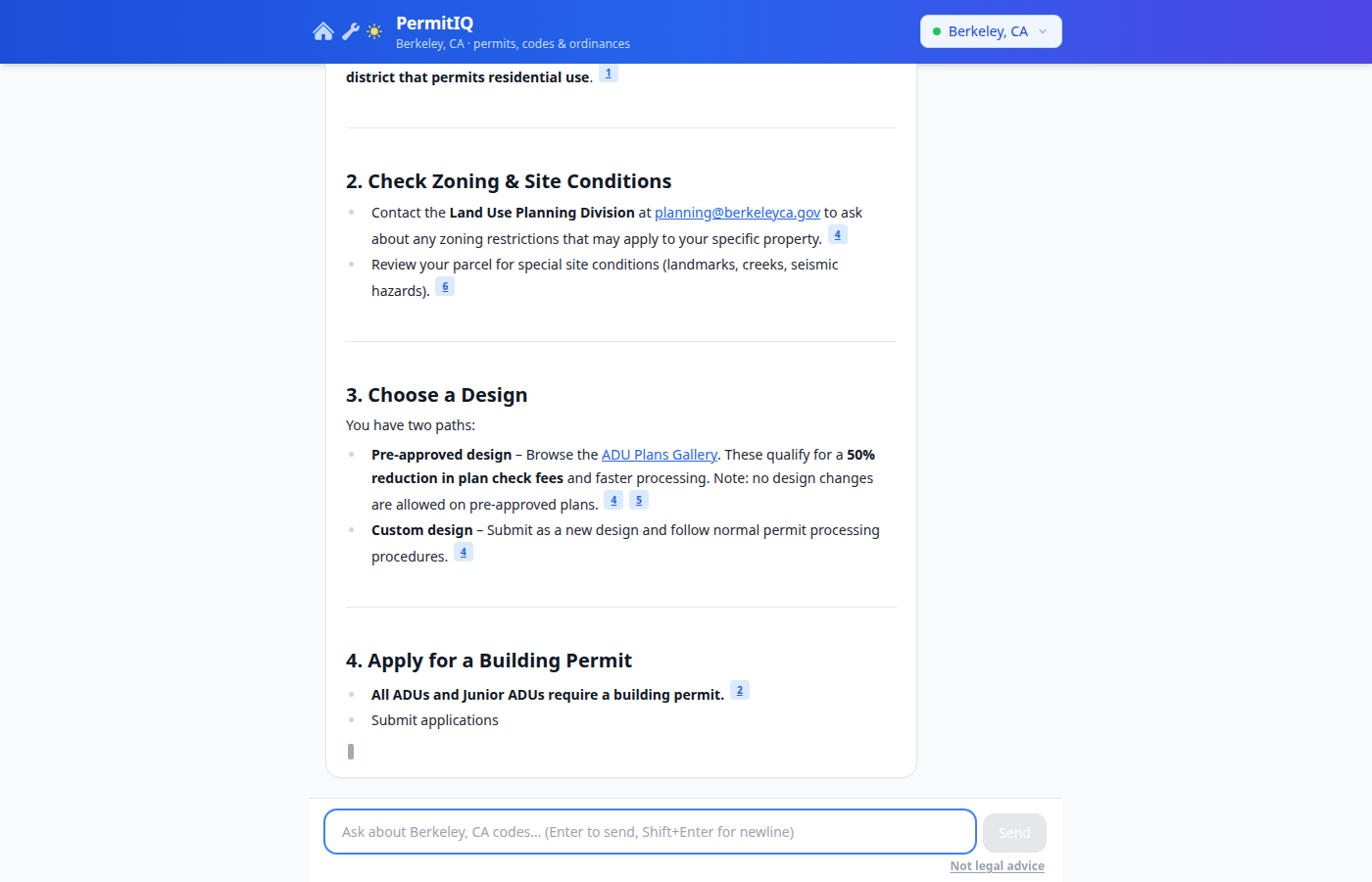
<p><img src="/assets/images/adu-screenshot.png" alt="PermitIQ answering &quot;What do I need to do to build an ADU in Berkeley, CA?&quot; with cited municipal code sections" /></p>

<hr />

<h2 id="how-these-systems-are-typically-built">How These Systems Are Typically Built</h2>

<p>Before I get into what I built, it helps to understand the standard playbook for RAG systems, because I followed it pretty closely before deviating in a few important places.</p>

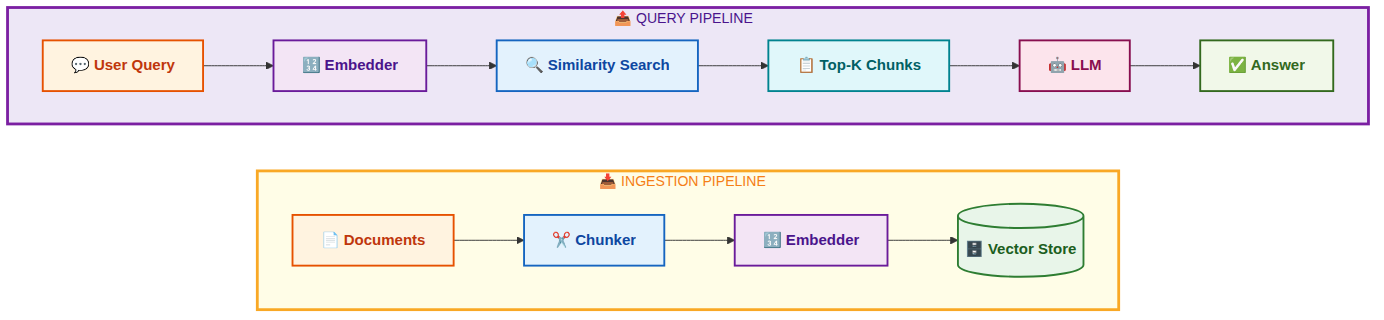
<p>A typical RAG pipeline looks like this:</p>

<p><img src="/assets/images/rag-standard.png" alt="Standard RAG Pipeline" /></p>

<p><strong>Step 1: Collect documents.</strong> You gather your source material. In most tutorials this is a folder of PDFs or a Wikipedia dump. In production it is usually a web scraper, a database export, or an API.</p>

<p><strong>Step 2: Chunk.</strong> You split documents into smaller pieces. Why? Because embedding models have token limits (usually 512 to 8192 tokens), and more importantly because a 50-page document embedded as one vector has diluted signal. You want each chunk to represent one coherent idea so that similarity search returns precise results.</p>

<p><strong>Step 3: Embed.</strong> You run each chunk through an embedding model, which converts the text into a vector (an array of numbers, typically 768 or 1536 dimensions). Texts with similar meaning end up geometrically close in this vector space.</p>

<p><strong>Step 4: Store.</strong> You save the vectors alongside the original text in a vector database. At query time you embed the user’s question, find the nearest vectors by cosine distance, and retrieve the corresponding text chunks.</p>

<p><strong>Step 5: Generate.</strong> You pass the retrieved chunks to an LLM as context. The LLM reads the retrieved passages and writes an answer grounded in them.</p>

<p>The standard beginner stack for this is: <strong>LangChain or LlamaIndex</strong> for orchestration, <strong>OpenAI</strong> for embeddings, <strong>Pinecone or Chroma</strong> for vector storage, and <strong>GPT-4</strong> for generation. It works fine for demos.</p>

<p>Where it breaks down in real production systems is in steps 1 and 2, which most tutorials treat as trivial. Getting clean, well-structured data is 90% of the work. I learned this the hard way.</p>

<hr />

<h2 id="my-architecture">My Architecture</h2>

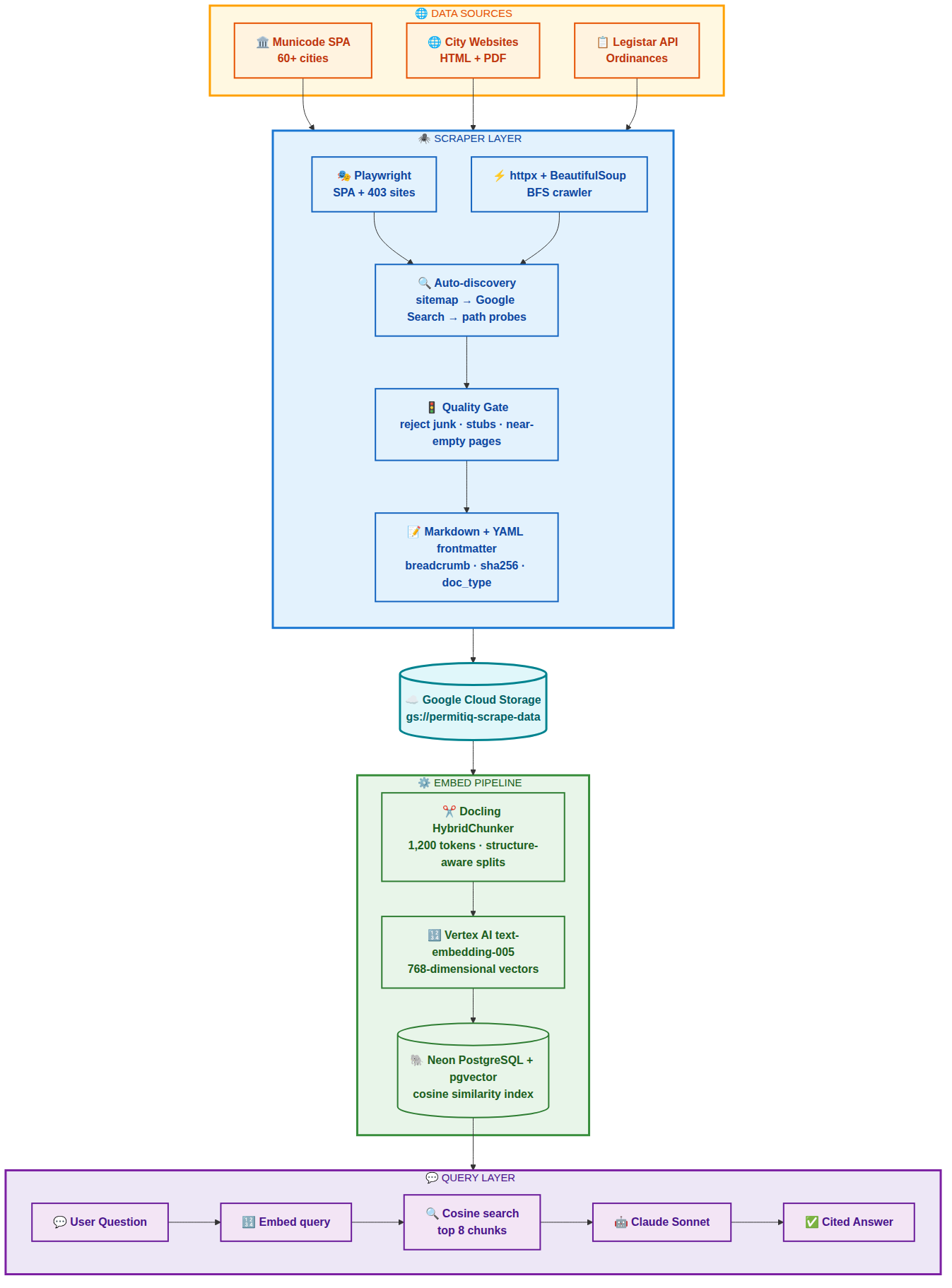
<p>Here is the complete data flow for PermitIQ:</p>

<p><img src="/assets/images/permitiq-arch.png" alt="PermitIQ Architecture" /></p>

<hr />

<h2 id="step-1-scraping">Step 1: Scraping</h2>

<p>Municipal data comes from three distinct source types, each requiring a different strategy.</p>

<h3 id="municode">Municode</h3>

<p>Most US cities publish their municipal code on library.municode.com, a single-page Angular application. A plain HTTP request returns an empty shell. The content is loaded dynamically by JavaScript after the page initializes.</p>

<p>The obvious solution is to run a headless browser for every page. That works but is painfully slow. A 3,000-node city code would take hours.</p>

<p>My approach was to use Playwright once to load the page and intercept the internal API calls the Angular app makes. I captured the session cookies, CSRF tokens, client ID, product ID, and job ID, then switched to parallel <code class="language-plaintext highlighter-rouge">httpx</code> requests for all the actual content fetching.</p>

<div class="language-python highlighter-rouge"><div class="highlight"><pre class="highlight"><code><span class="k">async</span> <span class="k">def</span> <span class="nf">_load_page</span><span class="p">(</span><span class="bp">self</span><span class="p">,</span> <span class="n">code_slug</span><span class="p">:</span> <span class="nb">str</span><span class="p">):</span>
    <span class="n">context</span> <span class="o">=</span> <span class="k">await</span> <span class="bp">self</span><span class="p">.</span><span class="n">browser</span><span class="p">.</span><span class="n">new_context</span><span class="p">(</span><span class="n">user_agent</span><span class="o">=</span><span class="bp">self</span><span class="p">.</span><span class="n">_UA</span><span class="p">)</span>
    <span class="n">page</span> <span class="o">=</span> <span class="k">await</span> <span class="n">context</span><span class="p">.</span><span class="n">new_page</span><span class="p">()</span>
    <span class="n">captured</span> <span class="o">=</span> <span class="p">{}</span>

    <span class="k">async</span> <span class="k">def</span> <span class="nf">on_response</span><span class="p">(</span><span class="n">response</span><span class="p">):</span>
        <span class="k">if</span> <span class="s">"/api/Clients/name"</span> <span class="ow">in</span> <span class="n">response</span><span class="p">.</span><span class="n">url</span><span class="p">:</span>
            <span class="n">captured</span><span class="p">[</span><span class="s">"client"</span><span class="p">]</span> <span class="o">=</span> <span class="k">await</span> <span class="n">response</span><span class="p">.</span><span class="n">json</span><span class="p">()</span>
        <span class="k">elif</span> <span class="s">"/api/Jobs/latest/"</span> <span class="ow">in</span> <span class="n">response</span><span class="p">.</span><span class="n">url</span><span class="p">:</span>
            <span class="n">captured</span><span class="p">[</span><span class="s">"job"</span><span class="p">]</span> <span class="o">=</span> <span class="k">await</span> <span class="n">response</span><span class="p">.</span><span class="n">json</span><span class="p">()</span>

    <span class="n">page</span><span class="p">.</span><span class="n">on</span><span class="p">(</span><span class="s">"response"</span><span class="p">,</span> <span class="n">on_response</span><span class="p">)</span>
    <span class="k">await</span> <span class="n">page</span><span class="p">.</span><span class="n">goto</span><span class="p">(</span><span class="n">seed_url</span><span class="p">,</span> <span class="n">wait_until</span><span class="o">=</span><span class="s">"networkidle"</span><span class="p">)</span>
    <span class="c1"># Switch to parallel httpx for content using captured cookies
</span></code></pre></div></div>

<p>This reduced a 3,500-node city from 3+ hours to under 10 minutes with 20 concurrent content fetches.</p>

<p>I also tracked the full parent heading chain for every node during BFS expansion of the table of contents, so that each scraped section knew its full breadcrumb path: “Planning Code &gt; Title 17 &gt; Chapter 17.102 &gt; ADUs &gt; Setback Requirements.” More on why this matters in the chunking section.</p>

<h3 id="city-websites">City Websites</h3>

<p>City websites are inconsistent (one wonders why there is no uniform government standard for how this data is published, but that is a story for another day). Some are plain HTML. Some are JavaScript SPAs that return 403 to non-browser requests. Some have sitemaps; many do not.</p>

<p>I built a two-tier crawler: a fast <code class="language-plaintext highlighter-rouge">httpx</code> + BeautifulSoup BFS crawler for plain HTML sites, and a Playwright-based BFS crawler for sites that block bot traffic. A discovery system finds the right entry points by trying, in order:</p>

<ol>
  <li>Parse <code class="language-plaintext highlighter-rouge">/sitemap.xml</code> and filter to permit-relevant URLs</li>
  <li>Google Custom Search API restricted to the city domain</li>
  <li>Probe 15 common paths like <code class="language-plaintext highlighter-rouge">/permits</code>, <code class="language-plaintext highlighter-rouge">/building</code>, <code class="language-plaintext highlighter-rouge">/planning-and-zoning</code></li>
</ol>

<p>One subtle bug I spent time on: many city sites redirect lowercase URLs to Title-Case paths. <code class="language-plaintext highlighter-rouge">/growth-and-development</code> becomes <code class="language-plaintext highlighter-rouge">/Growth-and-Development</code> after the redirect. I had to make all URL boundary checks case-insensitive to avoid breaking out of the crawl boundary.</p>

<h3 id="legistar">Legistar</h3>

<p>Municode lags reality by months. Ordinances passed recently are in Legistar, the legislative tracking system many cities use. I bulk-fetch the last 5 years of ordinances and resolutions via the Legistar REST API, and also do recursive resolution: any ordinance number cited in code text gets fetched, and any new numbers found in those texts get fetched too.</p>

<h3 id="content-quality-gate">Content Quality Gate</h3>

<p>Not everything a BFS crawler finds is worth keeping. City websites are full of cookie consent pages, navigation stubs, and template pages. I added a filter before saving anything:</p>

<div class="language-python highlighter-rouge"><div class="highlight"><pre class="highlight"><code><span class="k">def</span> <span class="nf">_content_is_useful</span><span class="p">(</span><span class="n">markdown</span><span class="p">:</span> <span class="nb">str</span><span class="p">)</span> <span class="o">-&gt;</span> <span class="nb">bool</span><span class="p">:</span>
    <span class="n">lines</span> <span class="o">=</span> <span class="p">[</span><span class="n">l</span><span class="p">.</span><span class="n">strip</span><span class="p">()</span> <span class="k">for</span> <span class="n">l</span> <span class="ow">in</span> <span class="n">markdown</span><span class="p">.</span><span class="n">splitlines</span><span class="p">()</span> <span class="k">if</span> <span class="n">l</span><span class="p">.</span><span class="n">strip</span><span class="p">()]</span>
    <span class="n">non_link</span> <span class="o">=</span> <span class="p">[</span><span class="n">l</span> <span class="k">for</span> <span class="n">l</span> <span class="ow">in</span> <span class="n">lines</span> <span class="k">if</span> <span class="ow">not</span> <span class="n">l</span><span class="p">.</span><span class="n">startswith</span><span class="p">(</span><span class="s">"["</span><span class="p">)</span> <span class="ow">and</span> <span class="s">"](http"</span> <span class="ow">not</span> <span class="ow">in</span> <span class="n">l</span><span class="p">]</span>
    <span class="k">if</span> <span class="nb">len</span><span class="p">(</span><span class="s">" "</span><span class="p">.</span><span class="n">join</span><span class="p">(</span><span class="n">non_link</span><span class="p">))</span> <span class="o">&lt;</span> <span class="mi">200</span><span class="p">:</span>
        <span class="k">return</span> <span class="bp">False</span>
    <span class="n">link_ratio</span> <span class="o">=</span> <span class="nb">sum</span><span class="p">(</span><span class="mi">1</span> <span class="k">for</span> <span class="n">l</span> <span class="ow">in</span> <span class="n">lines</span> <span class="k">if</span> <span class="s">"](http"</span> <span class="ow">in</span> <span class="n">l</span><span class="p">)</span> <span class="o">/</span> <span class="nb">len</span><span class="p">(</span><span class="n">lines</span><span class="p">)</span>
    <span class="k">if</span> <span class="n">link_ratio</span> <span class="o">&gt;</span> <span class="mf">0.8</span><span class="p">:</span>
        <span class="k">return</span> <span class="bp">False</span>
    <span class="k">return</span> <span class="bp">True</span>
</code></pre></div></div>

<p>Garbage chunks poison retrieval quality more than missing chunks. A smaller high-quality corpus consistently beats a massive noisy one.</p>

<h3 id="yaml-frontmatter">YAML Frontmatter</h3>

<p>Every saved markdown file gets a YAML frontmatter block:</p>

<div class="language-yaml highlighter-rouge"><div class="highlight"><pre class="highlight"><code><span class="nn">---</span>
<span class="na">source_url</span><span class="pi">:</span> <span class="s">https://library.municode.com/ca/oakland/codes/code_of_ordinances?nodeId=ABC123</span>
<span class="na">city</span><span class="pi">:</span> <span class="s">oakland</span>
<span class="na">doc_type</span><span class="pi">:</span> <span class="s">municode_section</span>
<span class="na">breadcrumb</span><span class="pi">:</span> <span class="s">Planning Code &gt; Title 17 &gt; Chapter 17.102 &gt; ADUs</span>
<span class="na">section_number</span><span class="pi">:</span> <span class="s">17.102.130</span>
<span class="na">fetched_at</span><span class="pi">:</span> <span class="s">2026-05-15T07:19:00Z</span>
<span class="na">content_sha256</span><span class="pi">:</span> <span class="s">7f9a3b...</span>
<span class="nn">---</span>
</code></pre></div></div>

<p>This metadata survives into the embedding pipeline and eventually into the vector database, making it possible to filter by city, doc type, or section number at query time.</p>

<hr />

<h2 id="step-2-chunking">Step 2: Chunking</h2>

<p>This is where most tutorials skip over the hard part. Splitting text intelligently is what separates useful retrieval from garbage retrieval.</p>

<h3 id="why-naive-chunking-fails">Why Naive Chunking Fails</h3>

<p>A fee schedule split at 1,000 characters might cut a table in half. A zoning section split mid-sentence loses the conditional clause that changes the entire meaning. A definition split from its header is orphaned text with no context.</p>

<p>I initially used simple token-count splitting. The results were bad. Retrieved chunks would be missing the heading that identified what code section they came from. Fee tables would be half-rendered. Conditions would be split from the rules they modified.</p>

<h3 id="docling-hybridchunker">Docling HybridChunker</h3>

<p>I switched to IBM’s Docling library with its <code class="language-plaintext highlighter-rouge">HybridChunker</code>. Docling converts markdown to a structured document model that understands headings, paragraphs, tables, and lists as distinct elements. The chunker splits along structural boundaries rather than arbitrary character counts, targeting 1,200 tokens per chunk.</p>

<p>Each chunk comes with <code class="language-plaintext highlighter-rouge">chunk.meta.headings</code>, the heading chain above that chunk in the document. I prepend this as a breadcrumb to the chunk text before embedding:</p>

<div class="language-python highlighter-rouge"><div class="highlight"><pre class="highlight"><code><span class="n">headings</span> <span class="o">=</span> <span class="nb">list</span><span class="p">(</span><span class="n">chunk</span><span class="p">.</span><span class="n">meta</span><span class="p">.</span><span class="n">headings</span><span class="p">)</span> <span class="k">if</span> <span class="n">chunk</span><span class="p">.</span><span class="n">meta</span><span class="p">.</span><span class="n">headings</span> <span class="k">else</span> <span class="p">[]</span>
<span class="n">breadcrumb</span> <span class="o">=</span> <span class="s">" &gt; "</span><span class="p">.</span><span class="n">join</span><span class="p">(</span><span class="n">headings</span><span class="p">)</span>
<span class="n">embed_text</span> <span class="o">=</span> <span class="sa">f</span><span class="s">"</span><span class="si">{</span><span class="n">breadcrumb</span><span class="si">}</span><span class="se">\n\n</span><span class="si">{</span><span class="n">chunk</span><span class="p">.</span><span class="n">text</span><span class="si">}</span><span class="s">"</span> <span class="k">if</span> <span class="n">breadcrumb</span> <span class="k">else</span> <span class="n">chunk</span><span class="p">.</span><span class="n">text</span>
</code></pre></div></div>

<p>The difference this makes is significant. The embedding model sees “Planning Code &gt; Residential Zones &gt; ADUs &gt; Setback Requirements: The minimum rear setback shall be 4 feet” instead of just “The minimum rear setback shall be 4 feet.” That context is what allows a query about ADU setbacks to reliably find this chunk.</p>

<h3 id="table-handling">Table Handling</h3>

<p><code class="language-plaintext highlighter-rouge">html2text</code> mangles HTML tables. Tables are exactly where fee schedules and permit requirement matrices live. I pre-process every <code class="language-plaintext highlighter-rouge">&lt;table&gt;</code> element with BeautifulSoup before passing the HTML to <code class="language-plaintext highlighter-rouge">html2text</code>, converting them to pipe tables:</p>

<div class="language-python highlighter-rouge"><div class="highlight"><pre class="highlight"><code><span class="k">def</span> <span class="nf">_table_to_pipe</span><span class="p">(</span><span class="n">table_tag</span><span class="p">)</span> <span class="o">-&gt;</span> <span class="nb">str</span><span class="p">:</span>
    <span class="n">rows</span> <span class="o">=</span> <span class="n">table_tag</span><span class="p">.</span><span class="n">find_all</span><span class="p">(</span><span class="s">"tr"</span><span class="p">)</span>
    <span class="n">md_rows</span> <span class="o">=</span> <span class="p">[]</span>
    <span class="k">for</span> <span class="n">i</span><span class="p">,</span> <span class="n">row</span> <span class="ow">in</span> <span class="nb">enumerate</span><span class="p">(</span><span class="n">rows</span><span class="p">):</span>
        <span class="n">cells</span> <span class="o">=</span> <span class="p">[</span><span class="n">c</span><span class="p">.</span><span class="n">get_text</span><span class="p">(</span><span class="s">" "</span><span class="p">,</span> <span class="n">strip</span><span class="o">=</span><span class="bp">True</span><span class="p">)</span> <span class="k">for</span> <span class="n">c</span> <span class="ow">in</span> <span class="n">row</span><span class="p">.</span><span class="n">find_all</span><span class="p">([</span><span class="s">"th"</span><span class="p">,</span> <span class="s">"td"</span><span class="p">])]</span>
        <span class="n">md_rows</span><span class="p">.</span><span class="n">append</span><span class="p">(</span><span class="s">"| "</span> <span class="o">+</span> <span class="s">" | "</span><span class="p">.</span><span class="n">join</span><span class="p">(</span><span class="n">cells</span><span class="p">)</span> <span class="o">+</span> <span class="s">" |"</span><span class="p">)</span>
        <span class="k">if</span> <span class="n">i</span> <span class="o">==</span> <span class="mi">0</span><span class="p">:</span>
            <span class="n">md_rows</span><span class="p">.</span><span class="n">append</span><span class="p">(</span><span class="s">"| "</span> <span class="o">+</span> <span class="s">" | "</span><span class="p">.</span><span class="n">join</span><span class="p">(</span><span class="s">"---"</span> <span class="k">for</span> <span class="n">_</span> <span class="ow">in</span> <span class="n">cells</span><span class="p">)</span> <span class="o">+</span> <span class="s">" |"</span><span class="p">)</span>
    <span class="k">return</span> <span class="s">"</span><span class="se">\n</span><span class="s">"</span><span class="p">.</span><span class="n">join</span><span class="p">(</span><span class="n">md_rows</span><span class="p">)</span>
</code></pre></div></div>

<hr />

<h2 id="step-3-vectorizing">Step 3: Vectorizing</h2>

<p>An embedding model converts text into a vector, an array of floating-point numbers in a high-dimensional space. Texts with similar meaning end up geometrically close. When I embed a user’s query, I can find the stored chunks whose vectors are nearest to the query vector. Those are the most semantically relevant passages.</p>

<h3 id="vertex-ai-text-embedding-005">Vertex AI text-embedding-005</h3>

<p>I use Google’s <code class="language-plaintext highlighter-rouge">text-embedding-005</code> model via Vertex AI. It produces 768-dimensional vectors, handles up to 2,048 tokens per input, and integrates natively with the rest of my GCP infrastructure.</p>

<div class="language-python highlighter-rouge"><div class="highlight"><pre class="highlight"><code><span class="n">inputs</span> <span class="o">=</span> <span class="p">[</span><span class="n">TextEmbeddingInput</span><span class="p">(</span><span class="n">text</span><span class="p">,</span> <span class="s">"RETRIEVAL_DOCUMENT"</span><span class="p">)</span> <span class="k">for</span> <span class="n">text</span> <span class="ow">in</span> <span class="n">batch</span><span class="p">]</span>
<span class="n">result</span> <span class="o">=</span> <span class="n">model</span><span class="p">.</span><span class="n">get_embeddings</span><span class="p">(</span><span class="n">inputs</span><span class="p">,</span> <span class="n">output_dimensionality</span><span class="o">=</span><span class="mi">768</span><span class="p">)</span>
<span class="n">vectors</span> <span class="o">=</span> <span class="p">[</span><span class="n">e</span><span class="p">.</span><span class="n">values</span> <span class="k">for</span> <span class="n">e</span> <span class="ow">in</span> <span class="n">result</span><span class="p">]</span>
</code></pre></div></div>

<p>I process chunks in batches of 10 with exponential backoff for rate limits. At scale (60 cities, ~5,000 chunks each) this is around 300,000 embedding API calls. Rate limit handling is not optional at that volume.</p>

<h3 id="neon-pgvector">Neon pgvector</h3>

<p>I store vectors in Neon, a serverless PostgreSQL service, using the pgvector extension:</p>

<div class="language-sql highlighter-rouge"><div class="highlight"><pre class="highlight"><code><span class="k">CREATE</span> <span class="k">TABLE</span> <span class="n">embeddings</span> <span class="p">(</span>
    <span class="n">id</span>          <span class="nb">TEXT</span> <span class="k">PRIMARY</span> <span class="k">KEY</span><span class="p">,</span>
    <span class="n">city</span>        <span class="nb">TEXT</span> <span class="k">NOT</span> <span class="k">NULL</span><span class="p">,</span>
    <span class="nb">text</span>        <span class="nb">TEXT</span> <span class="k">NOT</span> <span class="k">NULL</span><span class="p">,</span>
    <span class="n">source_url</span>  <span class="nb">TEXT</span><span class="p">,</span>
    <span class="n">breadcrumb</span>  <span class="nb">TEXT</span><span class="p">,</span>
    <span class="n">section_num</span> <span class="nb">TEXT</span><span class="p">,</span>
    <span class="n">embedding</span>   <span class="n">vector</span><span class="p">(</span><span class="mi">768</span><span class="p">)</span>
<span class="p">);</span>
<span class="k">CREATE</span> <span class="k">INDEX</span> <span class="k">ON</span> <span class="n">embeddings</span> <span class="k">USING</span> <span class="n">ivfflat</span> <span class="p">(</span><span class="n">embedding</span> <span class="n">vector_cosine_ops</span><span class="p">);</span>
</code></pre></div></div>

<p>At query time:</p>

<div class="language-sql highlighter-rouge"><div class="highlight"><pre class="highlight"><code><span class="k">SELECT</span> <span class="nb">text</span><span class="p">,</span> <span class="n">source_url</span><span class="p">,</span> <span class="n">breadcrumb</span><span class="p">,</span> <span class="n">section_num</span>
<span class="k">FROM</span> <span class="n">embeddings</span>
<span class="k">WHERE</span> <span class="n">city</span> <span class="o">=</span> <span class="err">$</span><span class="mi">1</span>
<span class="k">ORDER</span> <span class="k">BY</span> <span class="n">embedding</span> <span class="o">&lt;=&gt;</span> <span class="err">$</span><span class="mi">2</span>
<span class="k">LIMIT</span> <span class="mi">8</span>
</code></pre></div></div>

<p>The <code class="language-plaintext highlighter-rouge">&lt;=&gt;</code> operator is pgvector’s cosine distance. The IVFFlat index keeps queries fast even with hundreds of thousands of vectors.</p>

<hr />

<h2 id="step-4-retrieval-augmented-generation">Step 4: Retrieval-Augmented Generation</h2>

<p>RAG is the pattern that ties everything together. Instead of asking an LLM to answer from memory, where it will hallucinate or give outdated information, I:</p>

<ol>
  <li>Retrieve the most relevant passages from the vector database</li>
  <li>Inject them into the LLM’s context as grounding material</li>
  <li>Ask the LLM to answer only from those passages and cite its sources</li>
</ol>

<div class="language-typescript highlighter-rouge"><div class="highlight"><pre class="highlight"><code><span class="kd">const</span> <span class="nx">queryVector</span> <span class="o">=</span> <span class="k">await</span> <span class="nx">embed</span><span class="p">(</span><span class="nx">userMessage</span><span class="p">)</span>
<span class="kd">const</span> <span class="nx">chunks</span> <span class="o">=</span> <span class="k">await</span> <span class="nx">queryChunks</span><span class="p">(</span><span class="nx">queryVector</span><span class="p">,</span> <span class="nx">city</span><span class="p">,</span> <span class="mi">8</span><span class="p">)</span>

<span class="kd">const</span> <span class="nx">context</span> <span class="o">=</span> <span class="nx">chunks</span><span class="p">.</span><span class="nx">map</span><span class="p">(</span><span class="nx">c</span> <span class="o">=&gt;</span>
  <span class="s2">`[</span><span class="p">${</span><span class="nx">c</span><span class="p">.</span><span class="nx">section_num</span> <span class="o">||</span> <span class="nx">c</span><span class="p">.</span><span class="nx">breadcrumb</span><span class="p">}</span><span class="s2">]\n</span><span class="p">${</span><span class="nx">c</span><span class="p">.</span><span class="nx">text</span><span class="p">}</span><span class="s2">\n(Source: </span><span class="p">${</span><span class="nx">c</span><span class="p">.</span><span class="nx">source_url</span><span class="p">}</span><span class="s2">)`</span>
<span class="p">).</span><span class="nx">join</span><span class="p">(</span><span class="dl">"</span><span class="se">\n\n</span><span class="s2">---</span><span class="se">\n\n</span><span class="dl">"</span><span class="p">)</span>

<span class="kd">const</span> <span class="nx">systemPrompt</span> <span class="o">=</span> <span class="s2">`You are a municipal code expert for </span><span class="p">${</span><span class="nx">city</span><span class="p">}</span><span class="s2">.
Answer using ONLY the code sections provided below.
Cite section numbers. If the answer is not in the provided sections, say so.

</span><span class="p">${</span><span class="nx">context</span><span class="p">}</span><span class="s2">`</span>
</code></pre></div></div>

<p>The key instruction is “answer using only the provided sections.” Without that constraint, Claude will fill gaps with plausible-sounding but potentially wrong information. With it, the model either gives a cited answer or honestly says it does not have the relevant section, which tells the user to check with the city directly rather than act on a hallucination.</p>

<hr />

<h2 id="technologies-initial-design-vs-final-implementation">Technologies: Initial Design vs. Final Implementation</h2>

<h3 id="where-i-started">Where I Started</h3>

<p>My original stack was: Pinecone for vector storage, Voyage AI for embeddings, Cloud SQL (PostgreSQL on GCP) for relational data, and a simple static-seed scraper that required manually configured URLs per city. Markdown files lived on local disk. Chunking used generic token-count splits.</p>

<p>This is a reasonable and well-documented starting point. Pinecone is purpose-built for vector search. Voyage AI produces excellent embeddings. Cloud SQL is solid managed PostgreSQL.</p>

<h3 id="where-i-ended-up">Where I Ended Up</h3>

<p>After hitting real-world data quality problems and scaling to 60 cities, the stack shifted significantly.</p>

<p><strong>Embeddings: Voyage AI to Vertex AI text-embedding-005.</strong> I consolidated onto GCP to simplify billing and authentication. Vertex AI integrates natively with Cloud Run and IAM, eliminating a separate vendor. Performance on retrieval benchmarks is comparable.</p>

<p><strong>Vector store: Pinecone to Neon pgvector.</strong> This was the biggest shift. I already needed relational storage for city metadata and job tracking. Consolidating onto one PostgreSQL instance with the pgvector extension eliminated Pinecone’s cost and reduced operational complexity. At my scale, the query performance is indistinguishable.</p>

<p><strong>Storage: Local filesystem to Google Cloud Storage.</strong> Scaling to 60 cities with a scraper that runs on one machine and an embedder that runs on another made local storage impractical. GCS gives durable shared storage that both scripts can access.</p>

<p><strong>Chunking: Token-count splits to Docling HybridChunker.</strong> This had the single largest impact on answer quality. Legal text has structure. Respecting that structure during chunking dramatically improves retrieval precision.</p>

<p><strong>Scraper: Static seeds to auto-discovery.</strong> Adding sitemap parsing, Google Custom Search integration, and a Playwright fallback for sites that block plain HTTP made the system scalable. Adding a new city went from “manually configure 10 seed URLs” to “add one line to a config file.”</p>

<p>The LLM itself was never the bottleneck. Claude’s API is reliable and capable. The hard work was entirely in the data pipeline: getting the right text, structured correctly, chunked intelligently, with enough metadata to filter and cite accurately. This is the part that most RAG tutorials compress into three lines of code.</p>

<hr />

<h2 id="what-i-learned">What I Learned</h2>

<p>Building this taught me things I could not have gotten from reading papers or following tutorials.</p>

<p>Data quality is the entire game. I spent more time on the scraper and chunker than on everything else combined. The vector search and LLM layers are surprisingly forgiving when the input data is good. They are completely useless when it is bad.</p>

<p>Structure-aware chunking is not optional for legal or technical documents. Generic token splitting works fine for narrative text. For anything with tables, numbered sections, conditional clauses, and defined terms, you need a chunker that understands the document model.</p>

<p>Breadcrumbs matter more than I expected. A short section with no heading context is nearly impossible to retrieve reliably. Prepending the full heading path to each chunk before embedding was one of the highest-leverage changes I made.</p>

<p>Rate limits at scale require real retry logic. Hitting 300,000 embedding API calls across 60 cities exposed every flaw in my backoff code. Handling the <code class="language-plaintext highlighter-rouge">Retry-After</code> header correctly and skipping failed batches gracefully rather than crashing took iteration.</p>

<p>Costs are lower than you might expect, but not zero. The bulk of my ~$100 GCP spend so far went to the initial Vertex AI embedding run across 60 cities, not to storage. The 9 GB of scraped markdown in Google Cloud Storage costs pennies a month. Neon’s Pro plan handles the pgvector database (roughly 1 GB of vectors once compressed) at around $19/month. Cloud Run for the app is negligible at hobby traffic levels. The catch is re-embedding: whenever a city updates its code and you re-scrape a large section, you pay for those embedding calls again. For 60 cities with codes that change constantly, that ongoing cost adds up if you run updates frequently.</p>

<hr />

<h2 id="what-is-next">What Is Next</h2>

<p>The system works well but has clear headroom:</p>

<ul>
  <li><strong>Temporal versioning.</strong> Municipal codes change constantly. Detecting when a section changes and re-embedding only the diff would keep the index current without full re-scrapes.</li>
  <li><strong>Entity extraction.</strong> Pulling ordinance numbers, zoning codes, permit types, and fee amounts into structured metadata would enable hybrid retrieval combining vector search with metadata filters.</li>
  <li><strong>Cross-city comparison.</strong> “How does Oakland’s ADU policy compare to Berkeley’s?” is architecturally straightforward but requires careful prompt design to avoid the model confusing the two cities’ rules.</li>
</ul>

<p>The data pipeline is what makes this defensible. Anyone can call an LLM API. Clean, well-structured, properly chunked municipal code with breadcrumb-enriched embeddings for 60+ cities takes real engineering work to build and maintain.</p>

<hr />

<h2 id="got-suggestions">Got Suggestions?</h2>

<p>If you have built something similar, a RAG system on legal, regulatory, or government data, I would love to hear what worked for you. Specifically: different chunking strategies, alternative embedding models, retrieval approaches I have not tried, or ways you handled data quality at scale. Drop a comment or reach out directly. I am still learning and genuinely curious what approaches others have taken.</p>

<hr />

<h2 id="musings">Musings</h2>

<p>Here is something I kept thinking about while building this.</p>

<p>Oakland has roughly 440,000 residents. Berkeley has about 120,000. Richmond clocks in around 115,000. These are not megacities. And yet each one maintains thousands of pages of code specifying exactly how you may remodel your kitchen, what permits you need to replace your bathtub, and the precise rules governing whether you can install a hot tub in your backyard.</p>

<p>Someone wrote those pages. Someone updates them. Someone fields the phone calls when a confused homeowner cannot find the answer. And for decades, the only way to access any of it was to either call City Hall, hire a permit expediter, or wade through PDFs that look like they were formatted in 1997.</p>

<p>I find it equal parts absurd and endearing. There is something very human about a government body carefully documenting the rules for backyard hot tubs. I just think it should be easier to find.</p>

<hr />

<h2 id="about-this-project">About This Project</h2>

<p>I built PermitIQ entirely on my own time, out of genuine curiosity. I am an engineer who likes to understand how things work by building them. Reading about RAG systems was not enough — I wanted to get my hands dirty, hit real problems, and figure out solutions. That is how I learn, and that is how I keep up with where technology is headed.</p>

<p>All the code, infrastructure, and data here are my own work, funded out of my own pocket. I deliberately chose to host this on my own GCP account rather than use any infrastructure from my employer. A misconfiguration in a personal side project should never be a vector for a security incident that could affect an entirely separate organization’s resources.</p>]]></content><author><name>Subodh Nijsure</name></author><category term="rag" /><category term="ml" /><category term="python" /><category term="ai" /><summary type="html"><![CDATA[Lessons from building a 60-city municipal code Q&A system.]]></summary></entry><entry><title type="html">40 Years of Decision Trees: From ID3 to XGBoost</title><link href="https://snijsure-personal.github.io/2026/03/01/ml-evolution-id3-to-xgboost/" rel="alternate" type="text/html" title="40 Years of Decision Trees: From ID3 to XGBoost" /><published>2026-03-01T00:00:00+00:00</published><updated>2026-03-01T00:00:00+00:00</updated><id>https://snijsure-personal.github.io/2026/03/01/ml-evolution-id3-to-xgboost</id><content type="html" xml:base="https://snijsure-personal.github.io/2026/03/01/ml-evolution-id3-to-xgboost/"><![CDATA[<h2 id="overview">Overview</h2>

<p>This is an account of implementing and comparing four decades of decision tree algorithms, from Quinlan’s foundational ID3 (1986) through modern gradient boosting with XGBoost and LightGBM. I built ID3 and C4.5 from scratch and tested all four against identical UCI datasets.</p>

<p>The short version: XGBoost brought a <strong>+7.43% accuracy improvement</strong> over ID3 with 81% less overfitting. On complex real-world datasets the gap widens to +65-70%.</p>

<p>Full code is on <a href="https://github.com/snijsure/id3-decision-tree">GitHub</a>.</p>

<hr />

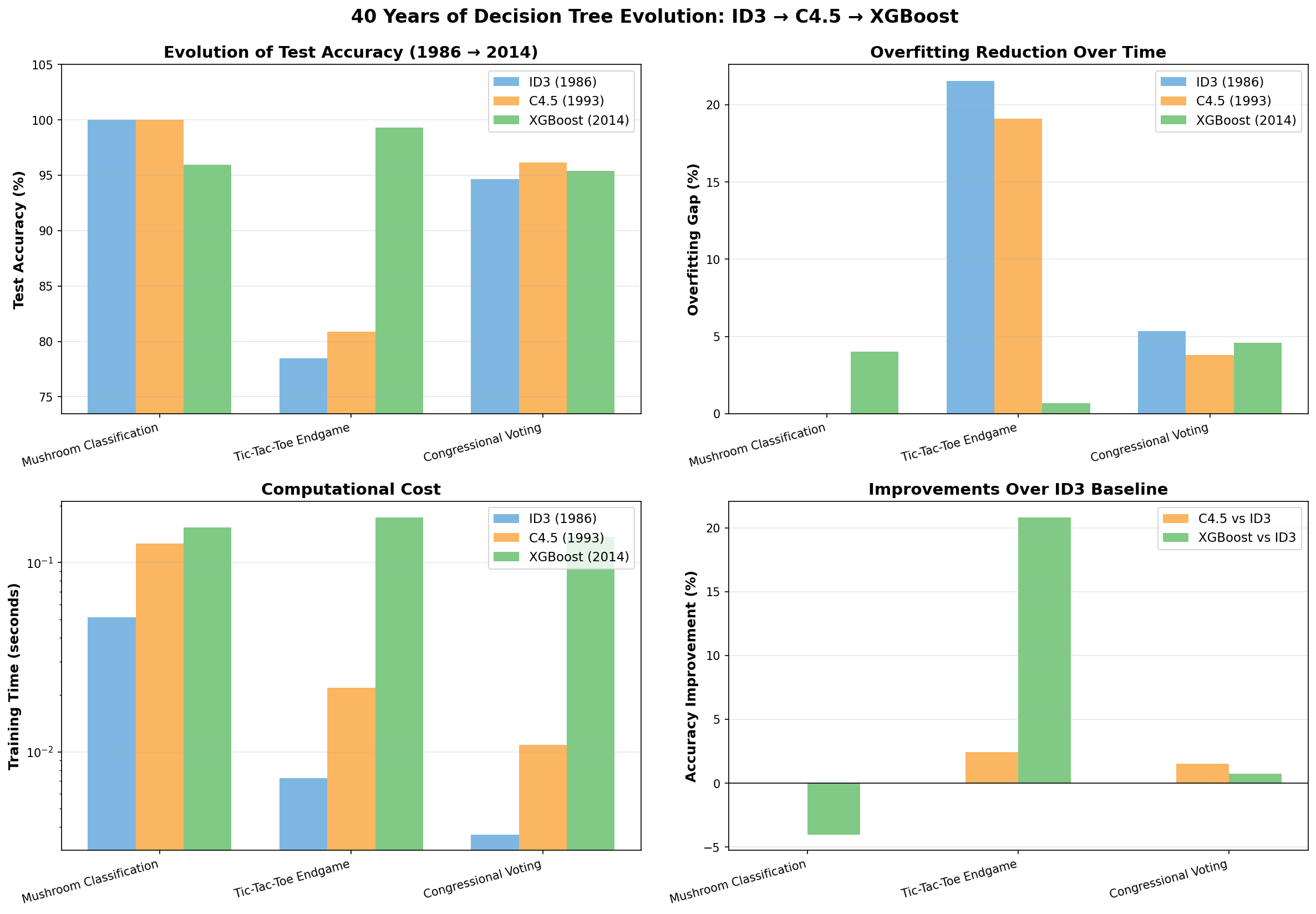
<h2 id="the-40-year-evolution">The 40-Year Evolution</h2>

<p><img src="https://raw.githubusercontent.com/snijsure/id3-decision-tree/main/outputs/evolution_plot.png" alt="Algorithm Evolution" /></p>

<table>
  <thead>
    <tr>
      <th>Algorithm</th>
      <th>Year</th>
      <th>Avg Accuracy</th>
      <th>vs ID3</th>
      <th>Overfitting</th>
      <th>Speed</th>
    </tr>
  </thead>
  <tbody>
    <tr>
      <td><strong>ID3</strong></td>
      <td>1986</td>
      <td>90.72%</td>
      <td>Baseline</td>
      <td>9.28%</td>
      <td>1.0x</td>
    </tr>
    <tr>
      <td><strong>C4.5</strong></td>
      <td>1993</td>
      <td>91.78%</td>
      <td>+1.06%</td>
      <td>8.22%</td>
      <td>2.4x</td>
    </tr>
    <tr>
      <td><strong>XGBoost</strong></td>
      <td>2014</td>
      <td><strong>98.15%</strong></td>
      <td><strong>+7.43%</strong></td>
      <td><strong>1.74%</strong></td>
      <td>6.7x</td>
    </tr>
  </tbody>
</table>

<p>On the Tic-Tac-Toe dataset, XGBoost achieves <strong>98.26% accuracy</strong> vs ID3’s <strong>76.74%</strong> — a 21.53% improvement while reducing overfitting by 92%.</p>

<hr />

<h2 id="the-algorithms">The Algorithms</h2>

<h3 id="id3-1986--information-gain">ID3 (1986) — Information Gain</h3>

<p>Quinlan’s original algorithm selects attributes that maximize information gain at each node using Shannon entropy.</p>

<div class="language-plaintext highlighter-rouge"><div class="highlight"><pre class="highlight"><code>gain(A) = I(p,n) - E(A)
</code></pre></div></div>

<p><strong>Limitations</strong>: overfits training data, biased toward multi-valued attributes, handles only discrete attributes.</p>

<h3 id="c45-1993--gain-ratio-and-pruning">C4.5 (1993) — Gain Ratio and Pruning</h3>

<p>Key improvements over ID3:</p>

<ul>
  <li><strong>Gain Ratio</strong>: normalizes information gain to reduce bias toward multi-valued attributes</li>
  <li><strong>Pessimistic Error Pruning</strong>: post-prunes trees to improve generalization</li>
  <li><strong>Continuous attributes</strong>: automatically finds optimal thresholds</li>
</ul>

<h3 id="xgboost-2014--gradient-boosting">XGBoost (2014) — Gradient Boosting</h3>

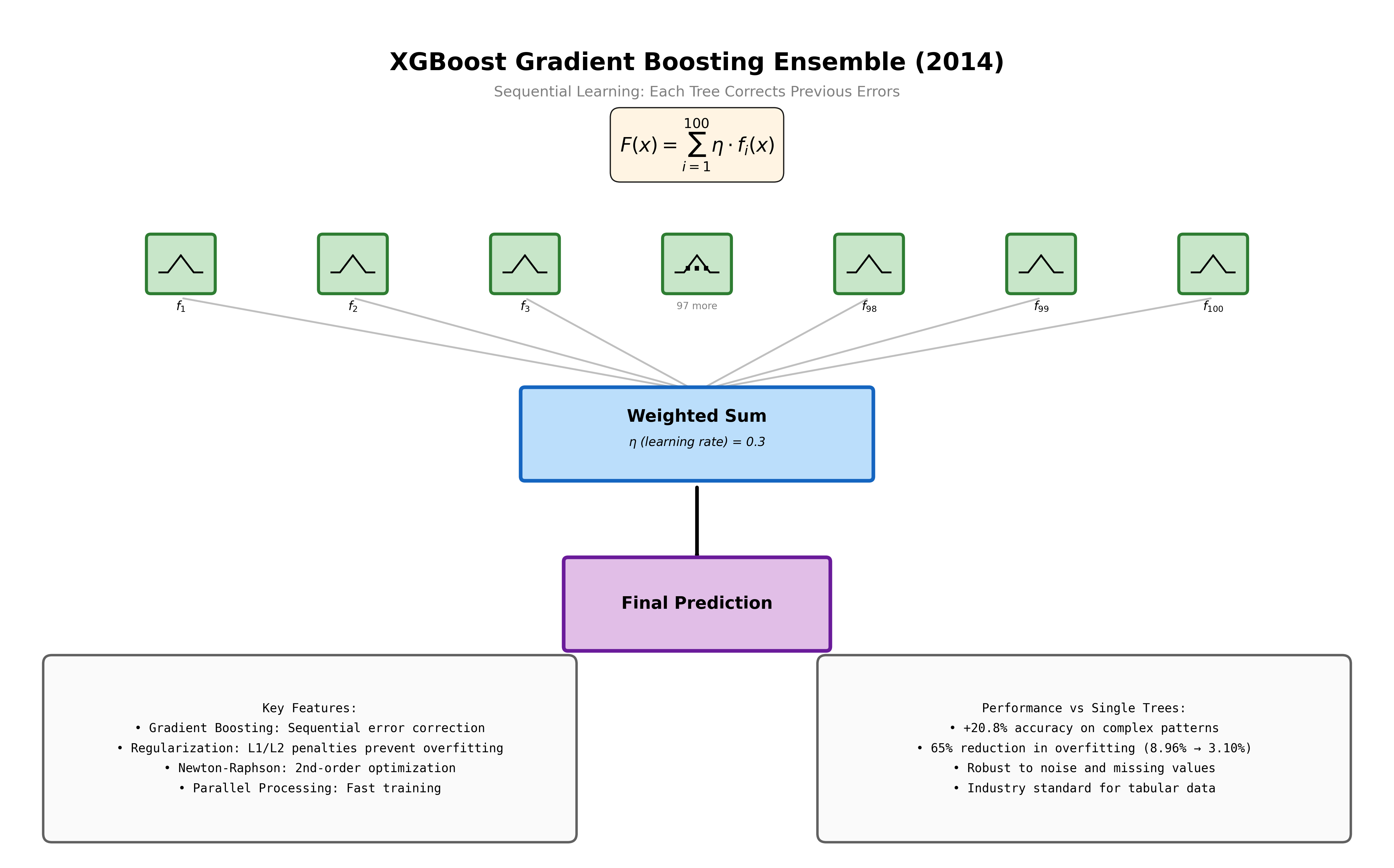
<p>Builds 100+ sequential trees, each correcting previous trees’ errors. Uses second-order Taylor approximation and L1/L2 regularization. This is what dominated Kaggle from 2015 to 2017 and remains the industry standard for tabular data.</p>

<h3 id="lightgbm-2017--faster-at-scale">LightGBM (2017) — Faster at Scale</h3>

<p>Microsoft’s improvement on XGBoost: histogram-based splitting, leaf-wise tree growth, and Gradient-based One-Side Sampling (GOSS). Dramatically faster on large datasets.</p>

<hr />

<h2 id="results-small-datasets">Results: Small Datasets</h2>

<h3 id="tic-tac-toe-endgame-958-instances">Tic-Tac-Toe Endgame (958 instances)</h3>

<table>
  <thead>
    <tr>
      <th>Algorithm</th>
      <th>Test Accuracy</th>
      <th>Overfitting</th>
    </tr>
  </thead>
  <tbody>
    <tr>
      <td>ID3</td>
      <td>76.74%</td>
      <td>23.26%</td>
    </tr>
    <tr>
      <td>C4.5</td>
      <td>79.17%</td>
      <td>20.83%</td>
    </tr>
    <tr>
      <td><strong>XGBoost</strong></td>
      <td><strong>98.26%</strong></td>
      <td><strong>1.74%</strong></td>
    </tr>
  </tbody>
</table>

<h3 id="mushroom-classification-8124-instances">Mushroom Classification (8,124 instances)</h3>

<p>All algorithms hit 100% — ceiling effect. C4.5 produces a 13.8% smaller tree than ID3 through pruning.</p>

<hr />

<h2 id="results-large-datasets-where-it-really-matters">Results: Large Datasets (Where It Really Matters)</h2>

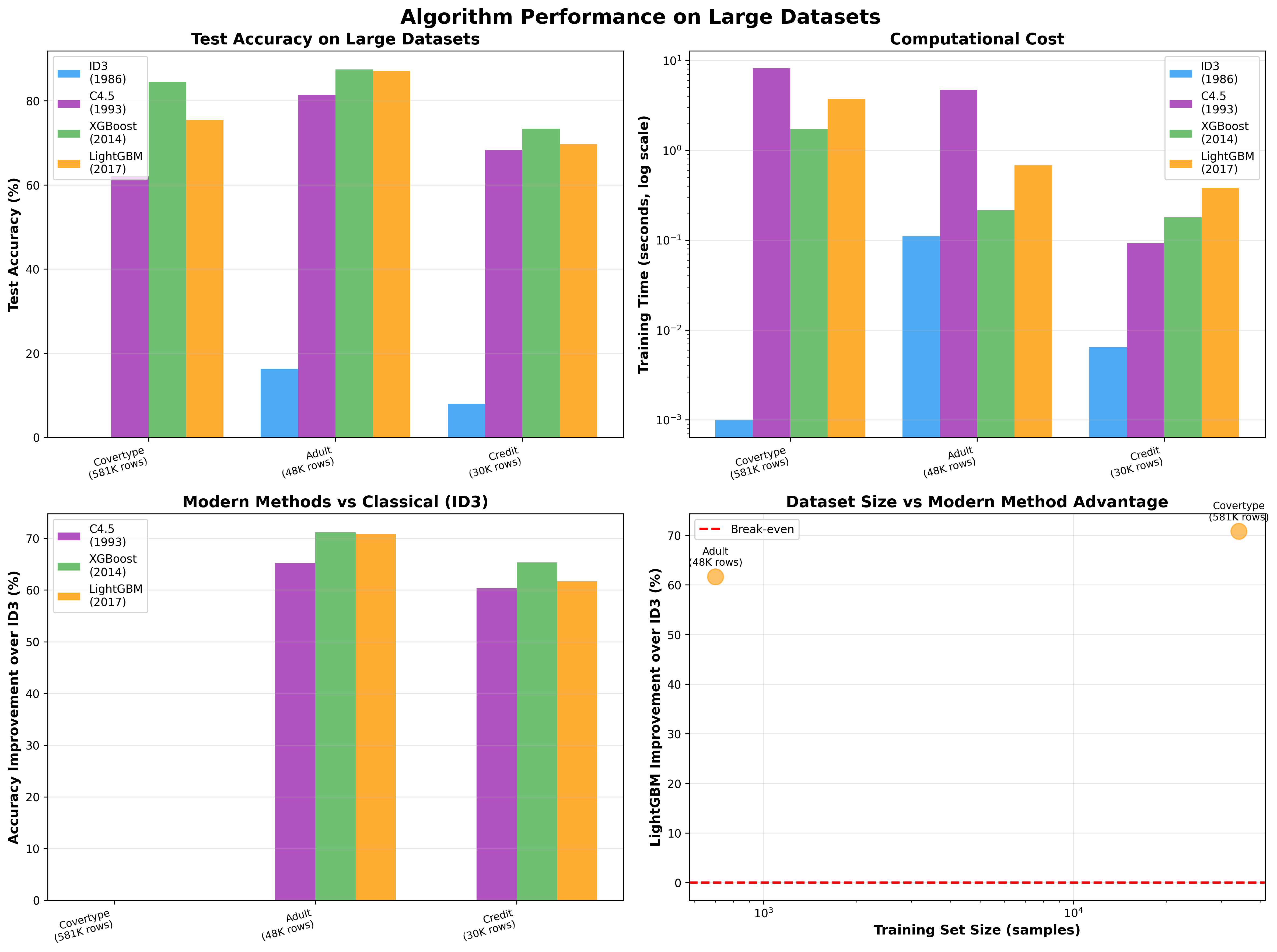
<p><img src="https://raw.githubusercontent.com/snijsure/id3-decision-tree/main/outputs/large_dataset_comparison.png" alt="Large Dataset Comparison" /></p>

<h3 id="adult-income-dataset-48k-examples">Adult Income Dataset (48K examples)</h3>

<table>
  <thead>
    <tr>
      <th>Algorithm</th>
      <th>Accuracy</th>
      <th>Time</th>
    </tr>
  </thead>
  <tbody>
    <tr>
      <td>ID3</td>
      <td>16.28%</td>
      <td>0.1s</td>
    </tr>
    <tr>
      <td>C4.5</td>
      <td>81.46%</td>
      <td>4.7s</td>
    </tr>
    <tr>
      <td><strong>XGBoost</strong></td>
      <td><strong>87.47%</strong></td>
      <td>0.2s</td>
    </tr>
    <tr>
      <td>LightGBM</td>
      <td>87.07%</td>
      <td>0.7s</td>
    </tr>
  </tbody>
</table>

<p>ID3 essentially fails on large real-world data. XGBoost trains faster than C4.5 while achieving +6% better accuracy.</p>

<h3 id="forest-cover-type-581k-examples">Forest Cover Type (581K examples)</h3>

<p>XGBoost hits <strong>84.53%</strong> vs C4.5’s 62.07% — a 22% improvement on 7-class classification.</p>

<hr />

<h2 id="decision-tree-visualizations">Decision Tree Visualizations</h2>

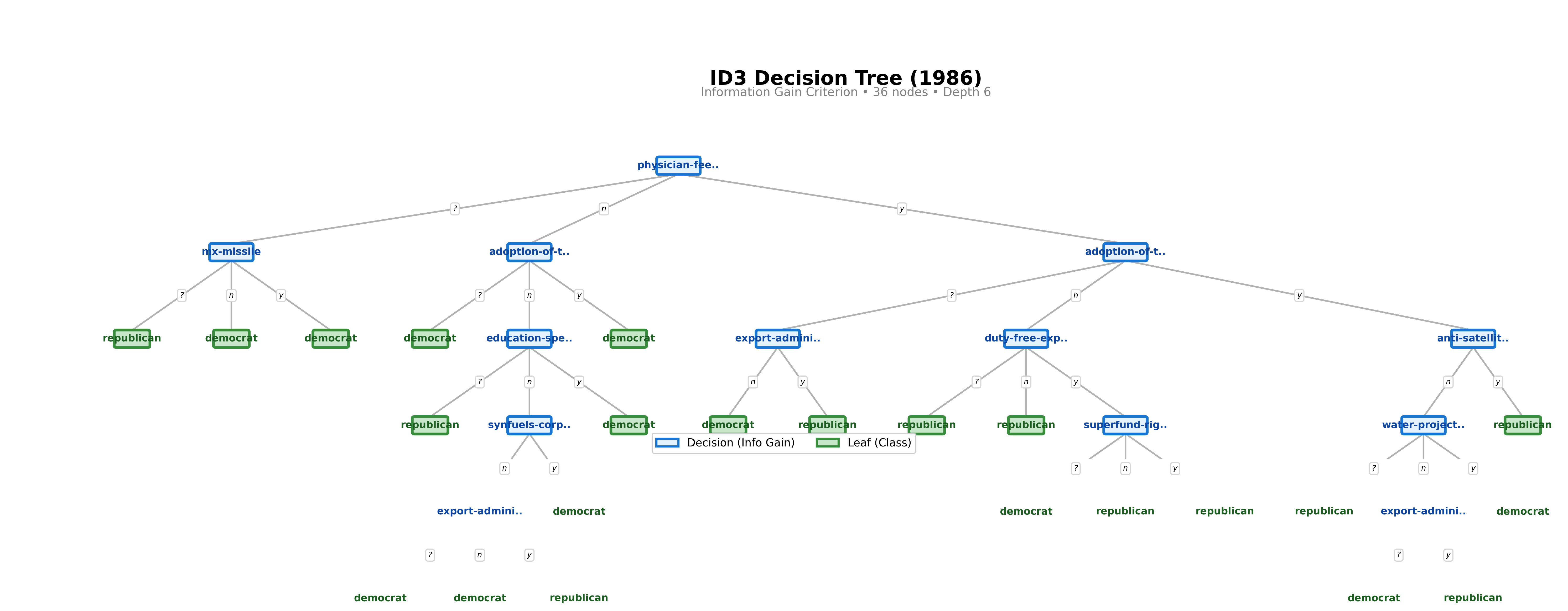
<h3 id="id3">ID3</h3>

<p><img src="https://raw.githubusercontent.com/snijsure/id3-decision-tree/main/outputs/id3_tree.png" alt="ID3 Decision Tree" /></p>

<p><em>36 nodes, depth 6. Unpruned, perfectly fits training data.</em></p>

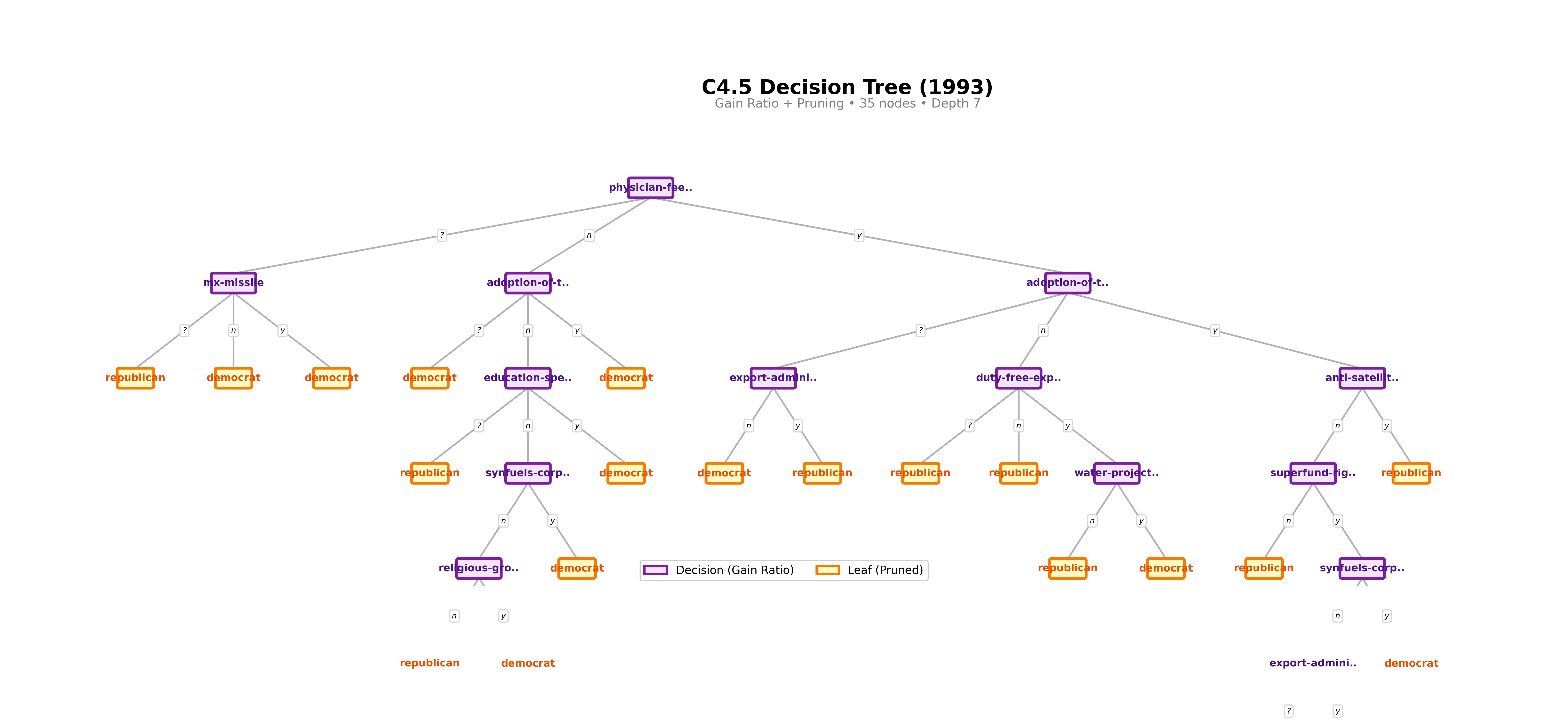
<h3 id="c45">C4.5</h3>

<p><img src="https://raw.githubusercontent.com/snijsure/id3-decision-tree/main/outputs/c45_tree.png" alt="C4.5 Decision Tree" /></p>

<p><em>35 nodes, depth 7. Slightly more compact despite greater depth, thanks to pruning.</em></p>

<h3 id="xgboost-ensemble">XGBoost Ensemble</h3>

<p><img src="https://raw.githubusercontent.com/snijsure/id3-decision-tree/main/outputs/xgboost_tree.png" alt="XGBoost Ensemble" /></p>

<p><em>100 sequential trees. Each corrects residual errors from the ensemble.</em></p>

<hr />

<h2 id="what-i-learned">What I Learned</h2>

<p><strong>Dataset size is everything.</strong> On small clean datasets (under 1K rows), all four algorithms perform similarly. On large real-world datasets, gradient boosting wins by 20-70%.</p>

<p><strong>C4.5’s improvements are real but modest.</strong> Pruning and gain ratio make a measurable difference in generalization but not a dramatic one. The jump from tree-based methods to ensemble methods is where performance really changes.</p>

<p><strong>Implementing from scratch is worth it.</strong> Reading Quinlan’s 1986 paper and then implementing ID3 line-by-line gave me an intuition for how tree splits work that I could not have gotten from calling <code class="language-plaintext highlighter-rouge">sklearn.tree.DecisionTreeClassifier</code>.</p>

<p><strong>XGBoost is still relevant in 2026.</strong> Despite deep learning dominating vision and language tasks, XGBoost and LightGBM remain the go-to for structured tabular data in production. The companies using them — Uber, Airbnb, Netflix, Microsoft — are not being lazy. They are using the right tool for the problem.</p>

<hr />

<h2 id="running-the-code">Running the Code</h2>

<div class="language-bash highlighter-rouge"><div class="highlight"><pre class="highlight"><code>git clone https://github.com/snijsure/id3-decision-tree
<span class="nb">cd </span>id3-decision-tree

<span class="c"># Full 40-year evolution comparison</span>
./run_experiment.sh evolution

<span class="c"># Modern comparison (all 4 algorithms)</span>
./run_experiment.sh modern

<span class="c"># Large dataset tests</span>
./run_experiment.sh large_dataset
</code></pre></div></div>

<p>This was the ML foundation that eventually led me to build <a href="https://snijsure-personal.github.io/2026/05/17/rag-system-real-messy-data/">PermitIQ</a> — a RAG system on 60+ cities of municipal code data. Different problem space, but the same instinct: learn by building something real.</p>]]></content><author><name>Subodh Nijsure</name></author><category term="ml" /><category term="python" /><category term="machinelearning" /><summary type="html"><![CDATA[Implementing and comparing ID3, C4.5, XGBoost, and LightGBM from scratch — tracing 40 years of decision tree innovation.]]></summary></entry></feed>