What I Learned Building a RAG System on Real, Messy Data
Lessons from building a 60-city municipal code Q&A system.
Background
Over the past six weeks I have been itching to go deeper into the ML and AI space. I had already explored classical ML algorithms, tracing the evolution from ID3 decision trees through XGBoost, but I wanted to understand how RAG (Retrieval-Augmented Generation) systems actually work in practice, not just in blog posts and tutorials.
I wanted to build something real. Something with messy, inconsistent data. Something at a scale large enough (9 GB of data) that naive approaches would actually break. And I wanted to do it completely on my own equipment and personal accounts, for reasons I explain at the bottom of this article.
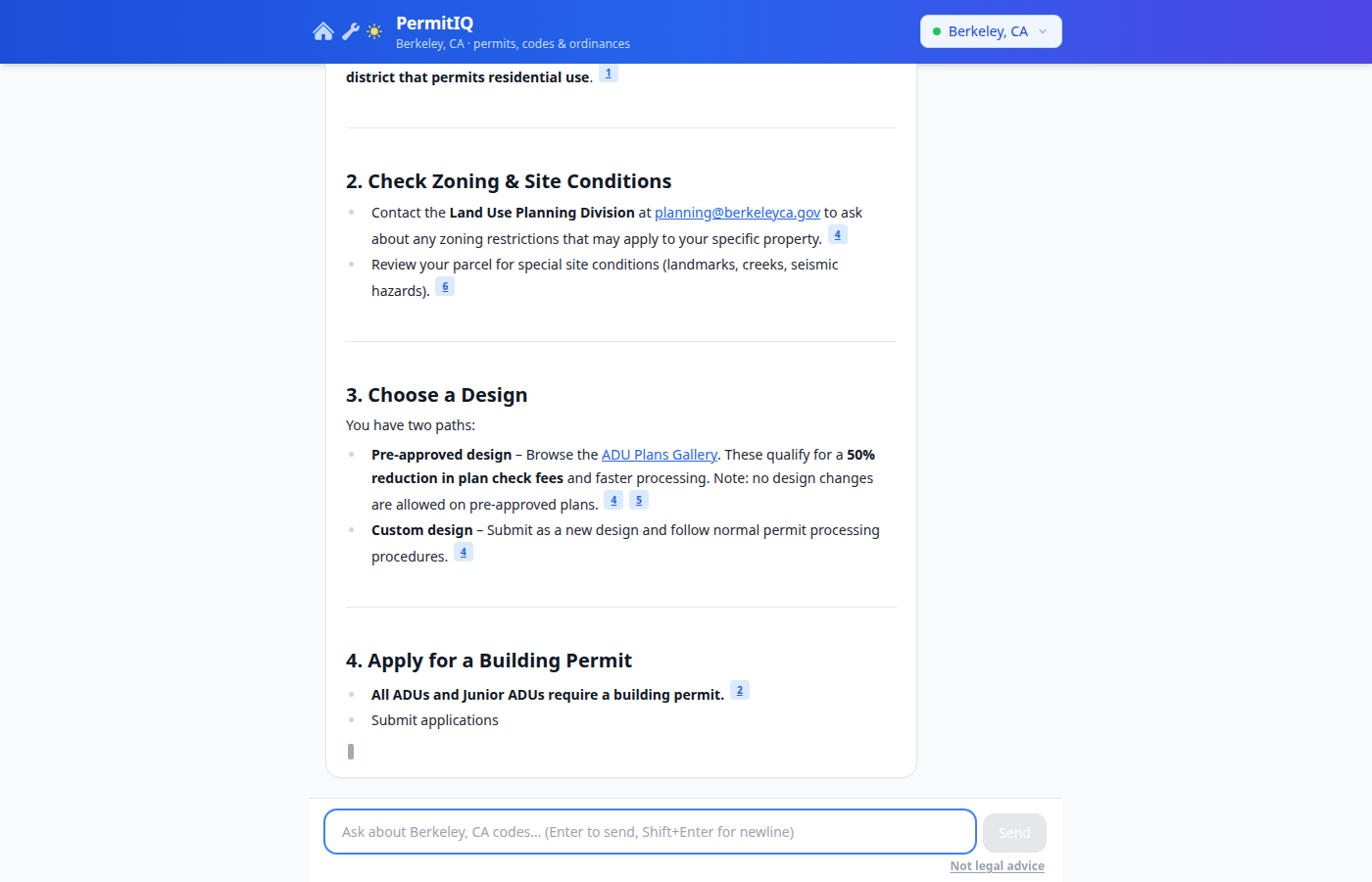
I picked municipal permit data as my domain. If you have ever tried to figure out whether you need a permit to add a deck, replace your windows, or build an ADU on your property, you know the problem: the information exists in public records but is buried inside thousands of pages of legal text scattered across city websites, PDF fee schedules, and legislative databases. I wanted to build a system that could answer plain English questions about building permits using the actual code as its source of truth.
The result is PermitIQ, a system covering 60+ US cities. This article is my honest account of how I built it.
How These Systems Are Typically Built
Before I get into what I built, it helps to understand the standard playbook for RAG systems, because I followed it pretty closely before deviating in a few important places.
A typical RAG pipeline looks like this:
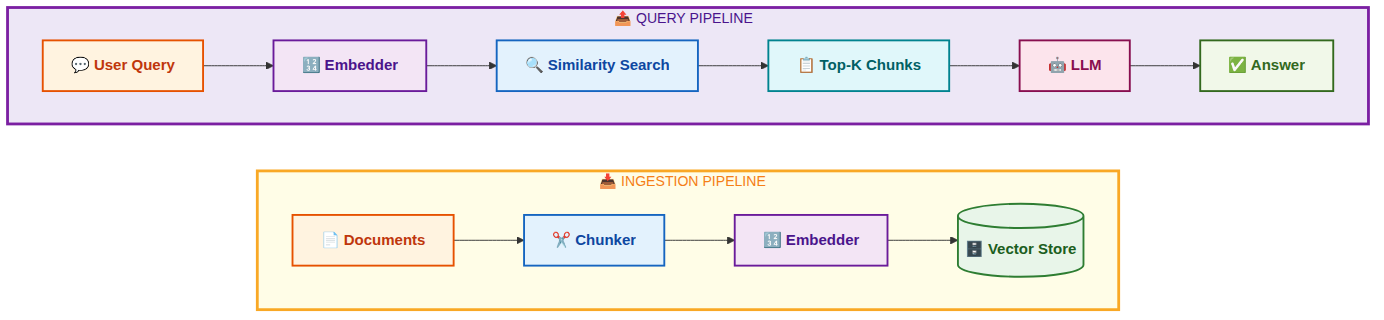
Step 1: Collect documents. You gather your source material. In most tutorials this is a folder of PDFs or a Wikipedia dump. In production it is usually a web scraper, a database export, or an API.
Step 2: Chunk. You split documents into smaller pieces. Why? Because embedding models have token limits (usually 512 to 8192 tokens), and more importantly because a 50-page document embedded as one vector has diluted signal. You want each chunk to represent one coherent idea so that similarity search returns precise results.
Step 3: Embed. You run each chunk through an embedding model, which converts the text into a vector (an array of numbers, typically 768 or 1536 dimensions). Texts with similar meaning end up geometrically close in this vector space.
Step 4: Store. You save the vectors alongside the original text in a vector database. At query time you embed the user’s question, find the nearest vectors by cosine distance, and retrieve the corresponding text chunks.
Step 5: Generate. You pass the retrieved chunks to an LLM as context. The LLM reads the retrieved passages and writes an answer grounded in them.
The standard beginner stack for this is: LangChain or LlamaIndex for orchestration, OpenAI for embeddings, Pinecone or Chroma for vector storage, and GPT-4 for generation. It works fine for demos.
Where it breaks down in real production systems is in steps 1 and 2, which most tutorials treat as trivial. Getting clean, well-structured data is 90% of the work. I learned this the hard way.
My Architecture
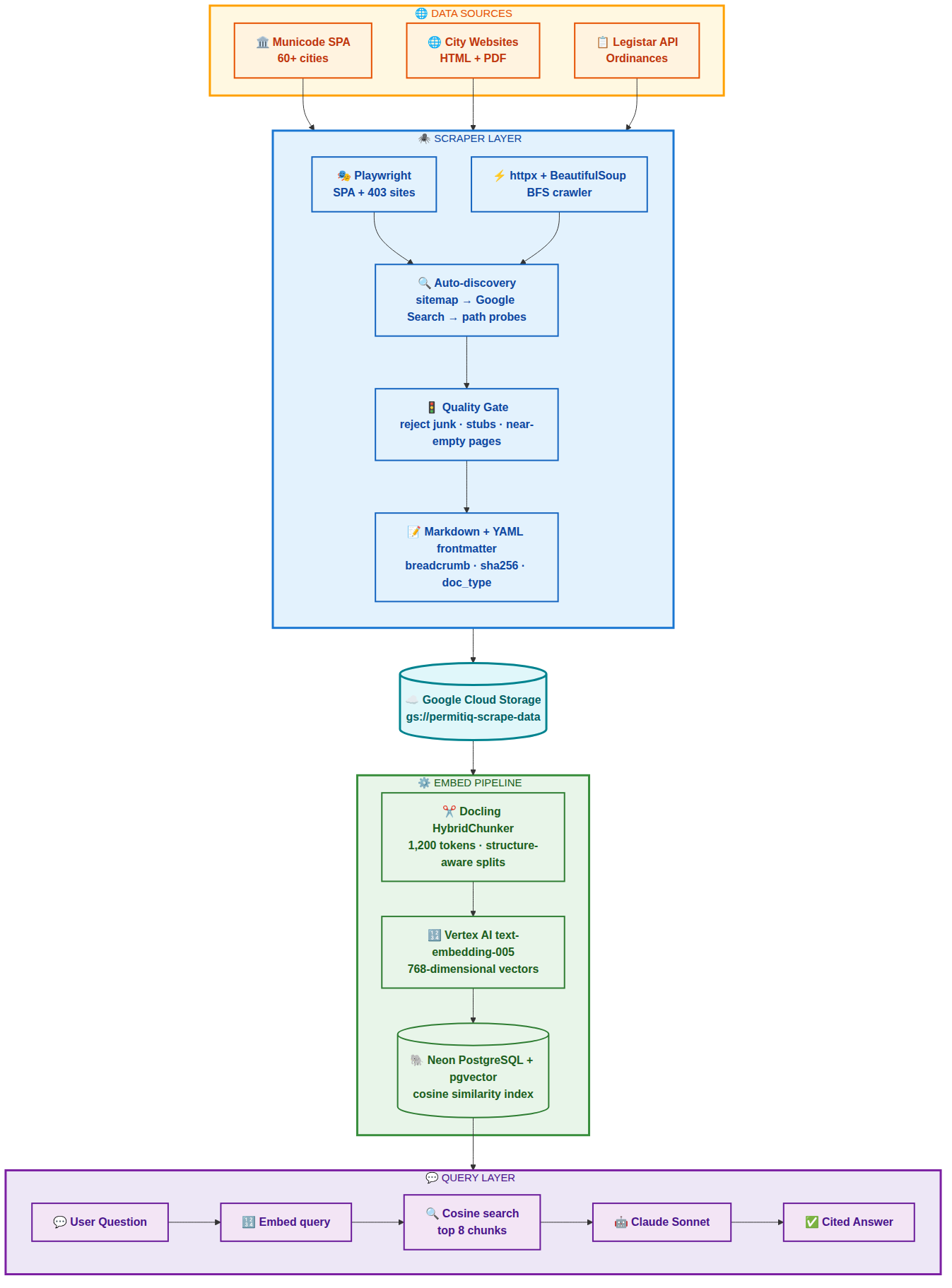
Here is the complete data flow for PermitIQ:
Step 1: Scraping
Municipal data comes from three distinct source types, each requiring a different strategy.
Municode
Most US cities publish their municipal code on library.municode.com, a single-page Angular application. A plain HTTP request returns an empty shell. The content is loaded dynamically by JavaScript after the page initializes.
The obvious solution is to run a headless browser for every page. That works but is painfully slow. A 3,000-node city code would take hours.
My approach was to use Playwright once to load the page and intercept the internal API calls the Angular app makes. I captured the session cookies, CSRF tokens, client ID, product ID, and job ID, then switched to parallel httpx requests for all the actual content fetching.
async def _load_page(self, code_slug: str):
    context = await self.browser.new_context(user_agent=self._UA)
    page = await context.new_page()
    captured = {}

    async def on_response(response):
        if "/api/Clients/name" in response.url:
            captured["client"] = await response.json()
        elif "/api/Jobs/latest/" in response.url:
            captured["job"] = await response.json()

    page.on("response", on_response)
    await page.goto(seed_url, wait_until="networkidle")
    # Switch to parallel httpx for content using captured cookies
This reduced a 3,500-node city from 3+ hours to under 10 minutes with 20 concurrent content fetches.
I also tracked the full parent heading chain for every node during BFS expansion of the table of contents, so that each scraped section knew its full breadcrumb path: “Planning Code > Title 17 > Chapter 17.102 > ADUs > Setback Requirements.” More on why this matters in the chunking section.
City Websites
City websites are inconsistent (one wonders why there is no uniform government standard for how this data is published, but that is a story for another day). Some are plain HTML. Some are JavaScript SPAs that return 403 to non-browser requests. Some have sitemaps; many do not.
I built a two-tier crawler: a fast httpx + BeautifulSoup BFS crawler for plain HTML sites, and a Playwright-based BFS crawler for sites that block bot traffic. A discovery system finds the right entry points by trying, in order:
- Parse
/sitemap.xmland filter to permit-relevant URLs - Google Custom Search API restricted to the city domain
- Probe 15 common paths like
/permits,/building,/planning-and-zoning
One subtle bug I spent time on: many city sites redirect lowercase URLs to Title-Case paths. /growth-and-development becomes /Growth-and-Development after the redirect. I had to make all URL boundary checks case-insensitive to avoid breaking out of the crawl boundary.
Legistar
Municode lags reality by months. Ordinances passed recently are in Legistar, the legislative tracking system many cities use. I bulk-fetch the last 5 years of ordinances and resolutions via the Legistar REST API, and also do recursive resolution: any ordinance number cited in code text gets fetched, and any new numbers found in those texts get fetched too.
Content Quality Gate
Not everything a BFS crawler finds is worth keeping. City websites are full of cookie consent pages, navigation stubs, and template pages. I added a filter before saving anything:
def _content_is_useful(markdown: str) -> bool:
    lines = [l.strip() for l in markdown.splitlines() if l.strip()]
    non_link = [l for l in lines if not l.startswith("[") and "](http" not in l]
    if len(" ".join(non_link)) < 200:
        return False
    link_ratio = sum(1 for l in lines if "](http" in l) / len(lines)
    if link_ratio > 0.8:
        return False
    return True
Garbage chunks poison retrieval quality more than missing chunks. A smaller high-quality corpus consistently beats a massive noisy one.
YAML Frontmatter
Every saved markdown file gets a YAML frontmatter block:
---
source_url: https://library.municode.com/ca/oakland/codes/code_of_ordinances?nodeId=ABC123
city: oakland
doc_type: municode_section
breadcrumb: Planning Code > Title 17 > Chapter 17.102 > ADUs
section_number: 17.102.130
fetched_at: 2026-05-15T07:19:00Z
content_sha256: 7f9a3b...
---
This metadata survives into the embedding pipeline and eventually into the vector database, making it possible to filter by city, doc type, or section number at query time.
Step 2: Chunking
This is where most tutorials skip over the hard part. Splitting text intelligently is what separates useful retrieval from garbage retrieval.
Why Naive Chunking Fails
A fee schedule split at 1,000 characters might cut a table in half. A zoning section split mid-sentence loses the conditional clause that changes the entire meaning. A definition split from its header is orphaned text with no context.
I initially used simple token-count splitting. The results were bad. Retrieved chunks would be missing the heading that identified what code section they came from. Fee tables would be half-rendered. Conditions would be split from the rules they modified.
Docling HybridChunker
I switched to IBM’s Docling library with its HybridChunker. Docling converts markdown to a structured document model that understands headings, paragraphs, tables, and lists as distinct elements. The chunker splits along structural boundaries rather than arbitrary character counts, targeting 1,200 tokens per chunk.
Each chunk comes with chunk.meta.headings, the heading chain above that chunk in the document. I prepend this as a breadcrumb to the chunk text before embedding:
headings = list(chunk.meta.headings) if chunk.meta.headings else []
breadcrumb = " > ".join(headings)
embed_text = f"{breadcrumb}\n\n{chunk.text}" if breadcrumb else chunk.text
The difference this makes is significant. The embedding model sees “Planning Code > Residential Zones > ADUs > Setback Requirements: The minimum rear setback shall be 4 feet” instead of just “The minimum rear setback shall be 4 feet.” That context is what allows a query about ADU setbacks to reliably find this chunk.
Table Handling
html2text mangles HTML tables. Tables are exactly where fee schedules and permit requirement matrices live. I pre-process every <table> element with BeautifulSoup before passing the HTML to html2text, converting them to pipe tables:
def _table_to_pipe(table_tag) -> str:
    rows = table_tag.find_all("tr")
    md_rows = []
    for i, row in enumerate(rows):
        cells = [c.get_text(" ", strip=True) for c in row.find_all(["th", "td"])]
        md_rows.append("| " + " | ".join(cells) + " |")
        if i == 0:
            md_rows.append("| " + " | ".join("---" for _ in cells) + " |")
    return "\n".join(md_rows)
Step 3: Vectorizing
An embedding model converts text into a vector, an array of floating-point numbers in a high-dimensional space. Texts with similar meaning end up geometrically close. When I embed a user’s query, I can find the stored chunks whose vectors are nearest to the query vector. Those are the most semantically relevant passages.
Vertex AI text-embedding-005
I use Google’s text-embedding-005 model via Vertex AI. It produces 768-dimensional vectors, handles up to 2,048 tokens per input, and integrates natively with the rest of my GCP infrastructure.
inputs = [TextEmbeddingInput(text, "RETRIEVAL_DOCUMENT") for text in batch]
result = model.get_embeddings(inputs, output_dimensionality=768)
vectors = [e.values for e in result]
I process chunks in batches of 10 with exponential backoff for rate limits. At scale (60 cities, ~5,000 chunks each) this is around 300,000 embedding API calls. Rate limit handling is not optional at that volume.
Neon pgvector
I store vectors in Neon, a serverless PostgreSQL service, using the pgvector extension:
CREATE TABLE embeddings (
    id          TEXT PRIMARY KEY,
    city        TEXT NOT NULL,
    text        TEXT NOT NULL,
    source_url  TEXT,
    breadcrumb  TEXT,
    section_num TEXT,
    embedding   vector(768)
);
CREATE INDEX ON embeddings USING ivfflat (embedding vector_cosine_ops);
At query time:
SELECT text, source_url, breadcrumb, section_num
FROM embeddings
WHERE city = $1
ORDER BY embedding <=> $2
LIMIT 8
The <=> operator is pgvector’s cosine distance. The IVFFlat index keeps queries fast even with hundreds of thousands of vectors.
Step 4: Retrieval-Augmented Generation
RAG is the pattern that ties everything together. Instead of asking an LLM to answer from memory, where it will hallucinate or give outdated information, I:
- Retrieve the most relevant passages from the vector database
- Inject them into the LLM’s context as grounding material
- Ask the LLM to answer only from those passages and cite its sources
const queryVector = await embed(userMessage)
const chunks = await queryChunks(queryVector, city, 8)

const context = chunks.map(c =>
  `[${c.section_num || c.breadcrumb}]\n${c.text}\n(Source: ${c.source_url})`
).join("\n\n---\n\n")

const systemPrompt = `You are a municipal code expert for ${city}.
Answer using ONLY the code sections provided below.
Cite section numbers. If the answer is not in the provided sections, say so.

${context}`
The key instruction is “answer using only the provided sections.” Without that constraint, Claude will fill gaps with plausible-sounding but potentially wrong information. With it, the model either gives a cited answer or honestly says it does not have the relevant section, which tells the user to check with the city directly rather than act on a hallucination.
Technologies: Initial Design vs. Final Implementation
Where I Started
My original stack was: Pinecone for vector storage, Voyage AI for embeddings, Cloud SQL (PostgreSQL on GCP) for relational data, and a simple static-seed scraper that required manually configured URLs per city. Markdown files lived on local disk. Chunking used generic token-count splits.
This is a reasonable and well-documented starting point. Pinecone is purpose-built for vector search. Voyage AI produces excellent embeddings. Cloud SQL is solid managed PostgreSQL.
Where I Ended Up
After hitting real-world data quality problems and scaling to 60 cities, the stack shifted significantly.
Embeddings: Voyage AI to Vertex AI text-embedding-005. I consolidated onto GCP to simplify billing and authentication. Vertex AI integrates natively with Cloud Run and IAM, eliminating a separate vendor. Performance on retrieval benchmarks is comparable.
Vector store: Pinecone to Neon pgvector. This was the biggest shift. I already needed relational storage for city metadata and job tracking. Consolidating onto one PostgreSQL instance with the pgvector extension eliminated Pinecone’s cost and reduced operational complexity. At my scale, the query performance is indistinguishable.
Storage: Local filesystem to Google Cloud Storage. Scaling to 60 cities with a scraper that runs on one machine and an embedder that runs on another made local storage impractical. GCS gives durable shared storage that both scripts can access.
Chunking: Token-count splits to Docling HybridChunker. This had the single largest impact on answer quality. Legal text has structure. Respecting that structure during chunking dramatically improves retrieval precision.
Scraper: Static seeds to auto-discovery. Adding sitemap parsing, Google Custom Search integration, and a Playwright fallback for sites that block plain HTTP made the system scalable. Adding a new city went from “manually configure 10 seed URLs” to “add one line to a config file.”
The LLM itself was never the bottleneck. Claude’s API is reliable and capable. The hard work was entirely in the data pipeline: getting the right text, structured correctly, chunked intelligently, with enough metadata to filter and cite accurately. This is the part that most RAG tutorials compress into three lines of code.
What I Learned
Building this taught me things I could not have gotten from reading papers or following tutorials.
Data quality is the entire game. I spent more time on the scraper and chunker than on everything else combined. The vector search and LLM layers are surprisingly forgiving when the input data is good. They are completely useless when it is bad.
Structure-aware chunking is not optional for legal or technical documents. Generic token splitting works fine for narrative text. For anything with tables, numbered sections, conditional clauses, and defined terms, you need a chunker that understands the document model.
Breadcrumbs matter more than I expected. A short section with no heading context is nearly impossible to retrieve reliably. Prepending the full heading path to each chunk before embedding was one of the highest-leverage changes I made.
Rate limits at scale require real retry logic. Hitting 300,000 embedding API calls across 60 cities exposed every flaw in my backoff code. Handling the Retry-After header correctly and skipping failed batches gracefully rather than crashing took iteration.
Costs are lower than you might expect, but not zero. The bulk of my ~$100 GCP spend so far went to the initial Vertex AI embedding run across 60 cities, not to storage. The 9 GB of scraped markdown in Google Cloud Storage costs pennies a month. Neon’s Pro plan handles the pgvector database (roughly 1 GB of vectors once compressed) at around $19/month. Cloud Run for the app is negligible at hobby traffic levels. The catch is re-embedding: whenever a city updates its code and you re-scrape a large section, you pay for those embedding calls again. For 60 cities with codes that change constantly, that ongoing cost adds up if you run updates frequently.
What Is Next
The system works well but has clear headroom:
- Temporal versioning. Municipal codes change constantly. Detecting when a section changes and re-embedding only the diff would keep the index current without full re-scrapes.
- Entity extraction. Pulling ordinance numbers, zoning codes, permit types, and fee amounts into structured metadata would enable hybrid retrieval combining vector search with metadata filters.
- Cross-city comparison. “How does Oakland’s ADU policy compare to Berkeley’s?” is architecturally straightforward but requires careful prompt design to avoid the model confusing the two cities’ rules.
The data pipeline is what makes this defensible. Anyone can call an LLM API. Clean, well-structured, properly chunked municipal code with breadcrumb-enriched embeddings for 60+ cities takes real engineering work to build and maintain.
Got Suggestions?
If you have built something similar, a RAG system on legal, regulatory, or government data, I would love to hear what worked for you. Specifically: different chunking strategies, alternative embedding models, retrieval approaches I have not tried, or ways you handled data quality at scale. Drop a comment or reach out directly. I am still learning and genuinely curious what approaches others have taken.
Musings
Here is something I kept thinking about while building this.
Oakland has roughly 440,000 residents. Berkeley has about 120,000. Richmond clocks in around 115,000. These are not megacities. And yet each one maintains thousands of pages of code specifying exactly how you may remodel your kitchen, what permits you need to replace your bathtub, and the precise rules governing whether you can install a hot tub in your backyard.
Someone wrote those pages. Someone updates them. Someone fields the phone calls when a confused homeowner cannot find the answer. And for decades, the only way to access any of it was to either call City Hall, hire a permit expediter, or wade through PDFs that look like they were formatted in 1997.
I find it equal parts absurd and endearing. There is something very human about a government body carefully documenting the rules for backyard hot tubs. I just think it should be easier to find.
About This Project
I built PermitIQ entirely on my own time, out of genuine curiosity. I am an engineer who likes to understand how things work by building them. Reading about RAG systems was not enough — I wanted to get my hands dirty, hit real problems, and figure out solutions. That is how I learn, and that is how I keep up with where technology is headed.
All the code, infrastructure, and data here are my own work, funded out of my own pocket. I deliberately chose to host this on my own GCP account rather than use any infrastructure from my employer. A misconfiguration in a personal side project should never be a vector for a security incident that could affect an entirely separate organization’s resources.